Forum Discussion

rodsan724
Oct 27, 2021Brass Contributor
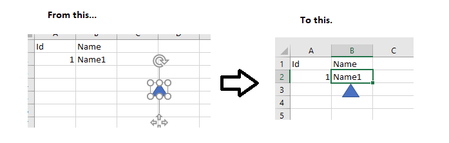
When I click a cell, how can I use VBA to move my shape to the bottom center of selected cell?
When I click any cell, how do I use VBA and cell selected event to move my shape to the bottom center of selected cell? For that matter, would it be much different to any of the sides of the selected...
- Oct 27, 2021
Ah, OK.
Private Sub Worksheet_SelectionChange(ByVal Target As Range)
    If Target.CountLarge > 1 Then Exit Sub
    With Me.Shapes(1)
        .Top = Target.Top + Target.Height - .Height
        .Left = Target.Left + (Target.Width - .Width) / 2
    End With
End Sub

rodsan724
Oct 27, 2021Brass Contributor
I was thinking more like when you helped me with VBA to do this. So it would be in the Cell Selected Event [Previous help you gave me]. I reworded OP.

HansVogelaar
Oct 27, 2021MVP
Ah, OK.
Private Sub Worksheet_SelectionChange(ByVal Target As Range)
    If Target.CountLarge > 1 Then Exit Sub
    With Me.Shapes(1)
        .Top = Target.Top + Target.Height - .Height
        .Left = Target.Left + (Target.Width - .Width) / 2
    End With
End Sub- rodsan724Oct 27, 2021Brass ContributorWow, you are a master! Is there a resource you recommend for this kind of stuff for beginners like me?
- HansVogelaarOct 28, 2021MVP