Forum Discussion

What's wrong with excel data model Month function malfunctioning
- Oct 02, 2021
That could mean you have texts which looks like date, not dates (aka numbers). Please check in Format, is it
or

As a comment:
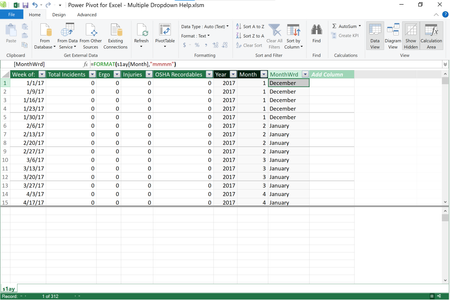
In DAX day number one is Dec 31, 1899. Thus MONTH(1) returns 12, i.e. December
In Excel day number one is Jan 01, 1900. Thus MONTH(1) returns 1, i.e. January.

https://social.technet.microsoft.com/wiki/contents/articles/1018.powerpivot-grouping-by-dates-months-quarters-years-etc-in-pivottables.aspx
- SergeiBaklanOct 01, 2021Diamond Contributor
I only tried to explain why
=FORMAT( 1, "mmmm")in DAX returns December, not January.
Actually you need to use another field as Subodh_Tiwari_sktneer suggested.
- Yea_SoOct 01, 2021Bronze Contributor
At first it was as what as @Subodh_Tiwari_sktneer suggested because I'd rather get the translation directly from the original value/date and it was December that's why I tried doing a go between as you can see in the image, just to make sure I wasn't dreaming up things.
- SergeiBaklanOct 02, 2021Diamond Contributor
Sorry, I missed. Your question is
"What's wrong with excel data model Month function malfunctioning"
The answer is - nothing is wrong with the function, it returns what it shall to return. We may only guess you expect to receive month name of the date, not month name of the month number. If so, instead of
=FORMAT( s1ay[Month], "mmmm" )it shall be
=FORMAT( s1ay[Week of:], "mmmm" )