Forum Discussion

little2fern
Apr 23, 2020Brass Contributor
What formula to use for multiplying countifs result?
Here is my current formula of C6. I need a new formula for C6 and my goal here is to - find out how many time 'AED' in cell B6 appears (in spreadsheet 'query result') within the selected dates of ce...
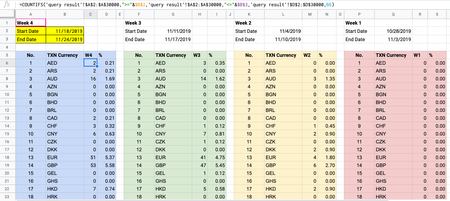
- Apr 27, 2020
If to sum that will be another task, formula for it is
=SUMIFS(
  'query result'!E:E,
   'query result'!A:A,">="&$B$2,
   'query result'!A:A,"<="&$B$3,
   'query result'!D:D,B6
)
as here

SergeiBaklan
Apr 24, 2020Diamond Contributor
I emulated that in the attached file
In your formulas just remove placeholders signs < >.

little2fern
Apr 27, 2020Brass Contributor
I tried removing the <> and it works, however the result isn't what I expect to see.
In your query result spreadsheet, there're two AED results shown in D4 and D9. This means that the sum of AED appearing in between start date 19/10/2019 and end date 20/03/2020 should be (8+3) = 11.
However this formula shows the result as 3 instead of 11.
What formula should I use in this case?
Thank you,
Fern
- SergeiBaklanApr 27, 2020Diamond Contributor
If to sum that will be another task, formula for it is
=SUMIFS(
  'query result'!E:E,
   'query result'!A:A,">="&$B$2,
   'query result'!A:A,"<="&$B$3,
   'query result'!D:D,B6
)
as here
- little2fernApr 27, 2020Brass Contributor
- SergeiBaklanApr 27, 2020Diamond Contributor
little2fern , you are welcome, glad to help