Forum Discussion

What formula to use for multiplying countifs result?
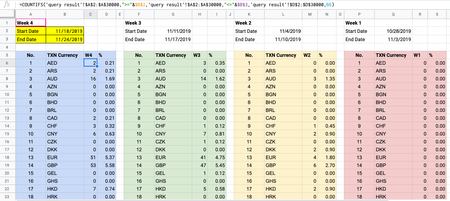
- Apr 27, 2020
If to sum that will be another task, formula for it is
=SUMIFS(
  'query result'!E:E,
   'query result'!A:A,">="&$B$2,
   'query result'!A:A,"<="&$B$3,
   'query result'!D:D,B6
)
as here

<Target Column E> means NUM_OF_TXN in column E of spreadsheet query result

<Currency Column> means TXN Currency in column B

<Currency Code> means TXN_CUR in column D of spreadsheet query result
Correct?

- little2fernApr 24, 2020Brass Contributor
Thanks.
I tried the formula below both in excel and google sheets, but it still doesn't work.
The error says, 'Formula parse error'.
=IFNA(INDEX(
  <'query result'!$E$2:$E$30000>,
  MATCH(1, INDEX(
     (<'query result'!$A$2:$A$30000> >= <$B$2>)*
     (<'query result'!$A$2:$A$30000> <= <$B$3>)*
     (<'query result'!$D$2:$D$30000> = <B6>),0),
  0)),0)
I think it would be easier if I share the file with you.
Can I have your gmail address please? The file is in Google Sheets.
- SergeiBaklanApr 24, 2020Diamond Contributor
I emulated that in the attached file
In your formulas just remove placeholders signs < >.
- little2fernApr 27, 2020Brass Contributor
I tried removing the <> and it works, however the result isn't what I expect to see.
In your query result spreadsheet, there're two AED results shown in D4 and D9. This means that the sum of AED appearing in between start date 19/10/2019 and end date 20/03/2020 should be (8+3) = 11.
However this formula shows the result as 3 instead of 11.
What formula should I use in this case?
Thank you,
Fern