Forum Discussion

little2fern
Apr 23, 2020Brass Contributor
What formula to use for multiplying countifs result?
Here is my current formula of C6. I need a new formula for C6 and my goal here is to - find out how many time 'AED' in cell B6 appears (in spreadsheet 'query result') within the selected dates of ce...
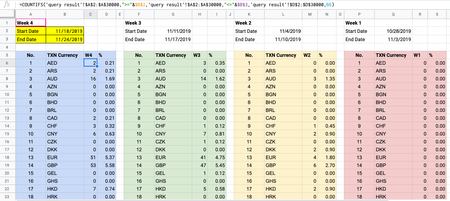
- Apr 27, 2020
If to sum that will be another task, formula for it is
=SUMIFS(
  'query result'!E:E,
   'query result'!A:A,">="&$B$2,
   'query result'!A:A,"<="&$B$3,
   'query result'!D:D,B6
)
as here

SergeiBaklan
Apr 23, 2020Diamond Contributor
I guess the first part with COUNTIFS works. To find the number form column E you may use INDEX/MATCH assuming first found number for given date range will be taken (if it could be few of them). Formula could be like
=IFNA(INDEX(
  <Target Column E>,
  MATCH(1, INDEX(
     (<Dates Column> >= <Start Date>)*
     (<Dates Column> <= <End Date>)*
     (<Currency Column> = <Currency Code>),0),
  0)),0)
We return zero if nothing was found.
 little2fernApr 23, 2020Brass Contributor
<Target Column E> means NUM_OF_TXN in column E of spreadsheet query result <Currency Column> means TXN Currency in column B <Currency Code> means TXN_CUR in column D of spreadsheet query resultCorrect?
- SergeiBaklanApr 24, 2020Diamond Contributor
- little2fernApr 24, 2020Brass Contributor
Thanks.
I tried the formula below both in excel and google sheets, but it still doesn't work.
The error says, 'Formula parse error'.
=IFNA(INDEX(
  <'query result'!$E$2:$E$30000>,
  MATCH(1, INDEX(
     (<'query result'!$A$2:$A$30000> >= <$B$2>)*
     (<'query result'!$A$2:$A$30000> <= <$B$3>)*
     (<'query result'!$D$2:$D$30000> = <B6>),0),
  0)),0)
I think it would be easier if I share the file with you.
Can I have your gmail address please? The file is in Google Sheets.