Forum Discussion

mbeee62
Jul 15, 2023Copper Contributor
What formula or function do I need?
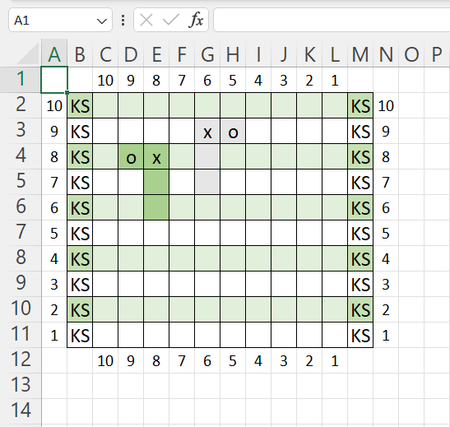
Hi all, I was wondering if somebody could help me out with this one ... Is there any way I could use a formula or function to color the cells in the way the picture shows when I insert an 'x' or...
- Jul 15, 2023
See the attached sample workbook. Click Conditional Formatting > Manage Rules... on the Home tab of the ribbon to see the rules I created.

mbeee62
Jul 15, 2023Copper Contributor
simple adding an 'x' or an 'o'. It is for making a pixelpattern. So when you enter an 'x' then the cells must behave like in the picture (coloring the cells where the x is in and the two below that one. Also when you enter an 'o', only the cell where the o is in.

HansVogelaar
Jul 15, 2023MVP
See the attached sample workbook. Click Conditional Formatting > Manage Rules... on the Home tab of the ribbon to see the rules I created.
- mbeee62Jul 15, 2023Copper ContributorThank you sooo much!! This works! 😄