Forum Discussion

mbeee62
Jul 15, 2023Copper Contributor
What formula or function do I need?
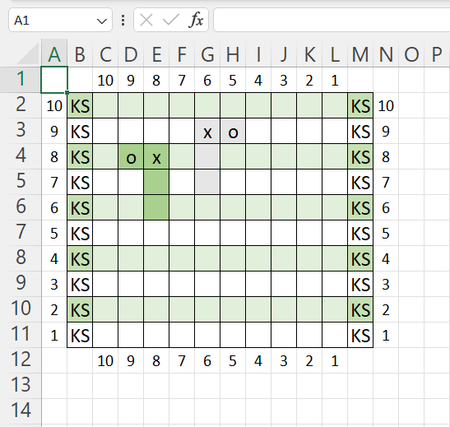
Hi all, I was wondering if somebody could help me out with this one ... Is there any way I could use a formula or function to color the cells in the way the picture shows when I insert an 'x' or...
- Jul 15, 2023
See the attached sample workbook. Click Conditional Formatting > Manage Rules... on the Home tab of the ribbon to see the rules I created.


ProSolutions
Jul 15, 2023Iron Contributor
Hello. Here are a few steps. Open Excel and locate the square where you want the color-changing effect. Select all the cells inside the square. Go to the "Home" tab, click "Conditional Formatting," and choose "New Rule." Select "Use a formula to determine which cells to format." Enter this formula: =OR(A1="x", A1="o") [Replace "A1" with the first cell of your square.] Click "Format" and choose the green color you want. Confirm the color choice by clicking "OK." Press "OK" again in the "New Formatting Rule" dialog box. Now, whenever you enter 'x' or 'o' in any cell inside the square, it will change to the chosen green color automatically. It's like magic!