Forum Discussion

HNF5483
Jan 23, 2020Copper Contributor
What am I missing?
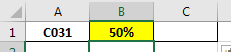
I am trying to create a spreadsheet that will automatically highlight and fill in specific cells, when a value is added to another cell. I have conditionally formatted the correct cell to highlight b...

HNF5483
Jan 23, 2020Copper Contributor
I tried =REPT(“FILL”,B4>0) and I get this error.
I keep running into this and it asks me to change the formula.

Twifoo
Jan 23, 2020Silver Contributor
The formula is B1>0, not B4>0. Anyway, that formula is equivalent to this, which you may try in C1:
=IF(B1>0,”FILL”,””)
=IF(B1>0,”FILL”,””)
- SergeiBaklanJan 23, 2020Diamond Contributor
HNF5483 We are always glad to help
- HNF5483Jan 23, 2020Copper Contributor
It Worked! Thank you so much SergeiBaklan & @Twifoo for all your help!
- SergeiBaklanJan 23, 2020Diamond Contributor
When, if you copy/pasted formula from here, most probably you need to change curve quote on normal one
instead of =REPT(“FILL”,B4>0) or like, use =REPT("FILL",B4>0) - HNF5483Jan 23, 2020Copper Contributor
I am yesSergeiBaklan
- SergeiBaklanJan 23, 2020Diamond Contributor
Are you both on English version?
