Forum Discussion

HNF5483
Jan 23, 2020Copper Contributor
What am I missing?
I am trying to create a spreadsheet that will automatically highlight and fill in specific cells, when a value is added to another cell. I have conditionally formatted the correct cell to highlight b...

Twifoo
Jan 23, 2020Silver Contributor
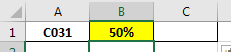
You may construct your formula in C1 like this:
=REPT(“FILL”,
B1>0)
=REPT(“FILL”,
B1>0)

HNF5483
Jan 23, 2020Copper Contributor
I tried =REPT(“FILL”,B4>0) and I get this error.
I keep running into this and it asks me to change the formula.
- TwifooJan 23, 2020Silver ContributorThe formula is B1>0, not B4>0. Anyway, that formula is equivalent to this, which you may try in C1:
=IF(B1>0,”FILL”,””)- HNF5483Jan 23, 2020Copper Contributor
DUH, Sorry it is super early in the morning here. I corrected it and still gives me the same error.
I tried the second formula and it still is not working. Twifoo
- SergeiBaklanJan 23, 2020Diamond Contributor
Are you both on English version?
