Forum Discussion

forsec0
Feb 15, 2023Copper Contributor
vlookup
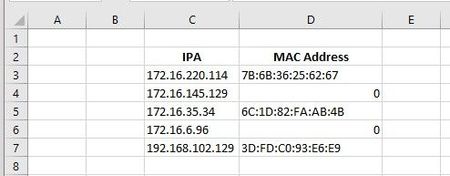
I need to get vlookup to continue searching table rows, that contain my search value, until it finds a non-blank cell I am looking to return or the search value is no longer listed. My vlookup comman...
- Feb 15, 2023
forsec0 VLOOKUP can't do that as it will only return the first match that it finds. And if that first one is a blank, you get 0. But since you are on MS365, try this:
=UNIQUE(FILTER(Sheet2!B:B,(Sheet2!A:A=$C3)*(Sheet2!B:B<>"")))


forsec0
Feb 15, 2023Copper Contributor
forsec0 I am using Microsoft 365. Also, is there a better function or method I should use?
forsec0
Feb 15, 2023Copper Contributor
The following is a link to the actual spreadsheet: https://1drv.ms/x/s!AlwDxVSZhCUPb3Y69uRrNg7Dlvc?e=WRpPbK
- Riny_van_EekelenFeb 15, 2023Platinum Contributor
forsec0 VLOOKUP can't do that as it will only return the first match that it finds. And if that first one is a blank, you get 0. But since you are on MS365, try this:
=UNIQUE(FILTER(Sheet2!B:B,(Sheet2!A:A=$C3)*(Sheet2!B:B<>"")))- forsec0Feb 16, 2023Copper ContributorIt worked!!! Thank you very much. Going forward, I will explore unique and filter.