Forum Discussion

Mikeyh146
Nov 18, 2022Copper Contributor
Vlookup to reference weekly sales
Hello, I am using a drop down list to select dates for viewing my weekly sales. I am then using a VLOOKUP to find me the results, in the table next to it I was it to reference a week before to s...
 Nov 22, 2022
VLOOKUP is a bit more direct but if you need to pull previous date's revenue, you can use INDEX-MATCH for both:
Current:=INDEX(Sheet2!$D$1:$D$21,MATCH($B$5,Sheet2!$C$1:$C$21,0))Previous:
=INDEX(Sheet2!$D$1:$D$21,MATCH($B$5,Sheet2!$C$1:$C$21,0)-1)

Mikeyh146
Nov 21, 2022Copper Contributor
Sorry should have started with this.
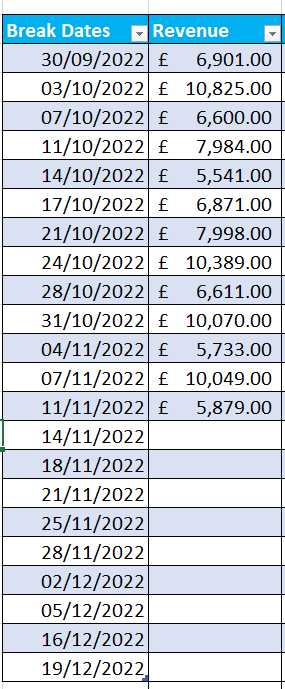
Attached are screen grabs from my excel,
I have drawn the flow of how I want it to go.
Select date > Fills cells > when cells fill it fills the other cells but 1 date before

Patrick2788
Nov 22, 2022Silver Contributor
VLOOKUP is a bit more direct but if you need to pull previous date's revenue, you can use INDEX-MATCH for both:
Current:
=INDEX(Sheet2!$D$1:$D$21,MATCH($B$5,Sheet2!$C$1:$C$21,0))Previous:
=INDEX(Sheet2!$D$1:$D$21,MATCH($B$5,Sheet2!$C$1:$C$21,0)-1)- Mikeyh146Nov 24, 2022Copper Contributorthank you this worked perfectly, I don't know why I didn't think of index match, thank you