Forum Discussion

VLOOKUP and INDIRECT Formula assistance needed
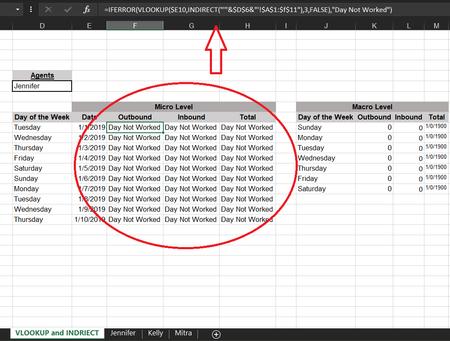
- Dec 24, 2019
First, name list of the sheets as sheets (or whatever name your prefer)
Second, correct column number in your latest version of VLOOKUP(), it shall be on one more in each formula.
Third, make branches for the selection from drop-down list, one for ALL and another one for any other name
IF($D$6="All",<sum on all sheets>, VLOOKUP as before)Next, adjust for your ranges formula from the link and combine all together. In F10 it'll be
=IFERROR(
   IF($D$6="All",
      SUMPRODUCT(
         SUMIF(
            INDIRECT("'"&sheets&"'!"&"$B$2:$B$10"),
            $E10,
            INDIRECT("'"&sheets&"'!"&"$C$2:$C$10")
         )
      ),
      VLOOKUP(
         $E10,
         INDIRECT("'"&$D$6&"'!$B$1:$f$11"),2,FALSE
      )
   ),
   "Day Not Worked"
)
similar for next columns and drag first row to the bottom.
Additionally, I'd suggest to take day of the week from the date to avoid extra errors

I walked through all your steps from scratch and did them all on my own to ensure I understood. However, i'm stuck on one thing, i cannot get my versions "ALL" to work. ... a little help? I've attached it. SergeiBaklan

Since you renamed sheets on List you shall update formulas accordingly. Other words all parts where sheets appears like
...INDIRECT("'"&sheets&"'!"&"$B$2:$B$10")...shall be changed on
INDIRECT("'"&List&"'!"&"$B$2:$B$10")
- shade206Dec 26, 2019Brass Contributor
Nice! So that worked for the Sample I created and we worked through. However, my actual document which i'm providing an abbreviated version of is not remedying with those same fixes. Can you take a look? SergeiBaklan
- SergeiBaklanDec 26, 2019Diamond Contributor
Hi,
3 points
1) Named range Sheets shall not include ALL, it is A6:A8
2) Data validation list shall include All, thus it'll be not Sheets but A6:A9
3) In the formula you have misprint, it's in red:
=IFERROR(IF($C$3="ALL",SUMPRODUCT(SUMIF(INDIRECT("'"&Sheets&"'!"&"$A$23:$A$350"),$D7,INDIRECT("'"&Sheets&"'!"&"$H$23:$H:$350"))),VLOOKUP($D7,INDIRECT("'"&$C$3&"'!$A$23:$N$350"),14,FALSE)),"Day Not Worked")
All above is corrected in attached file, please check attached.
In email I've seen your post which was removed - yes, the performance is an issue with INDIRECT() and especially with combination SUMPRODUCT(). If that becomes critical the approach is to be revised - another data structuring, perhaps Power Query or VBA. I have no concrete suggestions right now, but I don't think the performance could be significantly improved with formulas only.
- shade206Dec 26, 2019Brass Contributor
Fantastic! That fixed the minor errors so now it is pulling data. However, I checked the data your version is pulling, and it is not correct in that all columns are pulling the same number so something might be wrong with the formula?... i.e. Outbound, Inbound are pulling the same numbers. SergeiBaklan