Forum Discussion

JDAV44
Apr 28, 2023Copper Contributor
VBA-copy row data to corresponding sheet
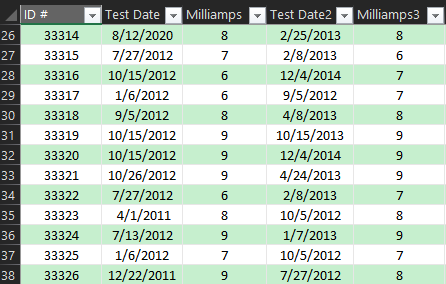
I was given the following table (much, much bigger but it gives the idea): I have corresponding sheets to column A with the main table = ALLDATA I found the following VBA code and used...

HansVogelaar
May 05, 2023MVP
Try this (it is not the fastest, but it should work).
Sub SplitData()
    Const IDCol = "A"
    Const HeaderRow = 1
    Const FirstRow = 2
    Dim SrcBook As Workbook
    Dim SrcSheet As Worksheet
    Dim TrgSheet As Worksheet
    Dim SrcRow As Long
    Dim LastRow As Long
    Dim TrgRow As Long
    Dim ID As String
    Application.ScreenUpdating = False
    Set SrcSheet = Worksheets("ALLDATA")
    LastRow = SrcSheet.Cells(SrcSheet.Rows.Count, IDCol).End(xlUp).Row
    For SrcRow = FirstRow To LastRow
        ID = SrcSheet.Cells(SrcRow, IDCol).Value
        Set TrgSheet = Nothing
        On Error Resume Next
        Set TrgSheet = Worksheets(ID)
        On Error GoTo 0
        If TrgSheet Is Nothing Then
            Set TrgSheet = Worksheets.Add(After:=Worksheets(Worksheets.Count))
            TrgSheet.Name = ID
            SrcSheet.Rows(HeaderRow).Copy Destination:=TrgSheet.Rows(HeaderRow)
        End If
        TrgRow = TrgSheet.Cells(TrgSheet.Rows.Count, IDCol).End(xlUp).Row + 1
        SrcSheet.Rows(SrcRow).Copy Destination:=TrgSheet.Rows(TrgRow)
    Next SrcRow
    Application.CutCopyMode = False
    Application.ScreenUpdating = True
End Sub
JDAV44
May 09, 2023Copper Contributor
Thank you so much for your help with this. I apologize for the delay as I was out of the office last week.
I tried running as you posted and it gives me:
Run-time error '1004':
Method 'Name' of object '_Worksheet' failed
When I debugged it, it highlights the line:
TrgSheet.Name = ID
Do you have any recommendations for that?
I tried running as you posted and it gives me:
Run-time error '1004':
Method 'Name' of object '_Worksheet' failed
When I debugged it, it highlights the line:
TrgSheet.Name = ID
Do you have any recommendations for that?
- HansVogelaarMay 09, 2023MVP
Are there rows with an empty ID? Or with an ID that looks very different from your screenshot?
- JDAV44May 09, 2023Copper ContributorYes. I just figured that out. There are rows I have left as empty where it's not matching the sheet name so that I have future growth of new equipment.
The code worked at copying the row over to the corresponding sheet.
I appreciate your help so much.
Do you have a recommendation on how I can learn more about how these work so that I can understand how to write these myself?- HansVogelaarMay 09, 2023MVP
This version of the macro will skip empty IDs:
Sub SplitData()
    Const IDCol = "A"
    Const HeaderRow = 1
    Const FirstRow = 2
    Dim SrcBook As Workbook
    Dim SrcSheet As Worksheet
    Dim TrgSheet As Worksheet
    Dim SrcRow As Long
    Dim LastRow As Long
    Dim TrgRow As Long
    Dim ID As String
    Application.ScreenUpdating = False
    Set SrcSheet = Worksheets("ALLDATA")
    LastRow = SrcSheet.Cells(SrcSheet.Rows.Count, IDCol).End(xlUp).Row
    For SrcRow = FirstRow To LastRow
        ID = SrcSheet.Cells(SrcRow, IDCol).Value
        If ID <> "" Then
            Set TrgSheet = Nothing
            On Error Resume Next
            Set TrgSheet = Worksheets(ID)
            On Error GoTo 0
            If TrgSheet Is Nothing Then
                Set TrgSheet = Worksheets.Add(After:=Worksheets(Worksheets.Count))
                TrgSheet.Name = ID
                SrcSheet.Rows(HeaderRow).Copy Destination:=TrgSheet.Rows(HeaderRow)
            End If
            TrgRow = TrgSheet.Cells(TrgSheet.Rows.Count, IDCol).End(xlUp).Row + 1
            SrcSheet.Rows(SrcRow).Copy Destination:=TrgSheet.Rows(TrgRow)
        End If
    Next SrcRow
    Application.CutCopyMode = False
    Application.ScreenUpdating = True
End Sub