Forum Discussion

Keat_Koid
Dec 26, 2023Copper Contributor
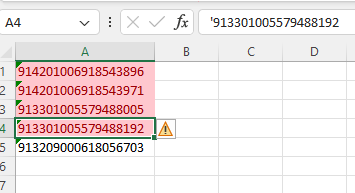
Value not same but is highlighted as duplicate in conditional formatting.
Hi, I would like to check if anyone know that how this possible when the value is not same in the spreadsheet, but it highlighted as duplicate value in conditional formatting. I try using Re...
- Dec 26, 2023
Keat_Koid Excel sees these as very large numbers but can't handle more than 15 digits. And looking at the first 15 digits only, the cells marked are indeed duplicates.
Haven't yet discovered a way to avoid this, other than putting an alpha-character before (tough not an apostrophe) or after the code.


SergeiBaklan
Dec 27, 2023Diamond Contributor
Alternatively you may apply conditional formatting rule as
with rule formula
=COUNTIF($A$1:$A$6, CHAR(173) & A1 ) > 1