Forum Discussion

Using VLOOKUP across multiple tabs with INDIRECT causing HAVOC
- Dec 20, 2019
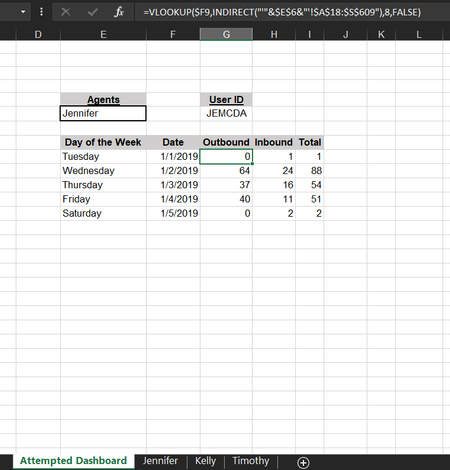
You have mix of dates and texts in your data. In main sheet
date for Thu and Fri are actually texts. In other sheets they are also different, e.g. for Jennifer
these are dates, and for Kelly
there are texts.
You need to format all cells as dates and re-enter texts as dates (they are actually number in Excel). Simple test - texts by default are aligned to the left, and numbers to the right. Or you may in any empty cell to test the formula as =A27+1. If returns #VALUE error you have the text in the cell.

Is it possible to submit the file?

- SergeiBaklanDec 20, 2019Diamond Contributor
You have mix of dates and texts in your data. In main sheet
date for Thu and Fri are actually texts. In other sheets they are also different, e.g. for Jennifer
these are dates, and for Kelly
there are texts.
You need to format all cells as dates and re-enter texts as dates (they are actually number in Excel). Simple test - texts by default are aligned to the left, and numbers to the right. Or you may in any empty cell to test the formula as =A27+1. If returns #VALUE error you have the text in the cell.