Forum Discussion

Using MS Excel to Calculate Rolling Headcount and Turnover
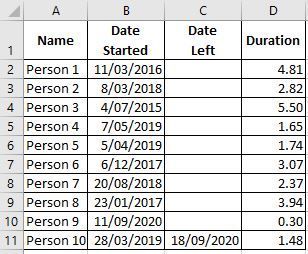
- Dec 31, 2020
1) In H2, enter the following array formula confirmed with Ctrl+Shift+Enter:
=SUMPRODUCT(($B$2:$B$11<=G2)*(IF($C$2:$C$11="",G2,$C$2:$C$11)>=G2))
Fill down.


Am I missing the point? Surely a headcount simply requires COUNTIFS to quantify the total number of hires up to and including the census date minus the total number of departures (adjusted by the headcount at the dawn of time if non-zero). Turnover is simply the change between to census dates, though the differences between two COUNTIFS can be combined into one by adding a 'started after' criterion.
These days, I might dress the solution up a bit and introduce a Lambda function 'HEADCOUNTλ'
= LAMBDA(Date,
      COUNTIFS(Table1[Date Started],"<="&Date)
      -  COUNTIFS(Table1[Date Left],"<="&Date) )
so that the worksheet formula reads
= HEADCOUNTλ(CensusDate)I am so glad to see the back of CSE though. I had schooled myself to use absolute references only and commit all formulae with CSE but it is such a relief to get rid of the practice.

Depends on goals. If for predefined date - yes. If slice and dice with periods, departments, etc - data model is more preferable.
 sdryfuseSep 28, 2021Copper Contributor
SergeiBaklan I appreciate everyone's help! I'm trying to bring two tables together to allow me to slice by department, age, gender, ethnicity, etc... for head count, hires, separations, and turnover. I'm using a month end date as the the predefined date to go off of when creating the pivot table. I attached the example workbook that has both tables involved. I have the formula setup in data2 table to do this, but I would like it to be more flexible. I hope this helps. Thank you again.
- PeterBartholomew1Sep 28, 2021Silver Contributor
You are right of course. The 'slicing and dicing' of large data sets is what BI was built for but, for smaller datasets that do not need to be loaded from external sources, dynamic array solutions can give database methods a run for their money. Maybe by defining a function,
= TURNOVERλ(StartDate, Period, "ProductEngineering")If you want to give the end user the option of selecting data through the use of slicers, then the data model is the natural solution.
- SergeiBaklanSep 28, 2021Diamond Contributor
Yes, often the question we asked is the small part of entire picture and we may only guess what is behind. Moreover, not always OP knows what exactly (s)he'd like to have.
By the way, that's why I'm not fun of "best response" logic here. Best answer for one is not best for another one. "My computer doesn't work, what shall I do?" has million of answers, who knows what's the best in concrete case?