Forum Discussion

Gamer85308
May 11, 2023Tin Contributor
Using INDEX and Match when the column in the second MATCH argument changes
Hello, I am using Office 365 and I this is my first post! I am using this formula and I need to change it =INDEX(Data!$B$5:$B$144, MATCH(I7,Data!$I$5:$I$144, 0)) The formula pulls the appropriat...
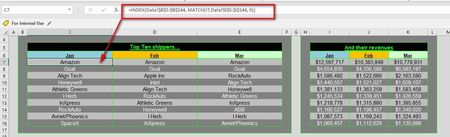
- May 12, 2023
I see that you have SEQUENCE in that second formula so that tells me you have Excel 365 (I believe)
In that case you can AND SHOULD replace both formulas with the new available formulas.
For example you can:
=TAKE(SORT(FILTER(Data!$G$5:$T$144, I$6=Data!$G$4:Data!$T$4),,-1),10)
So basically filter the whole table (g5:t144) based on the column header = this column header, and then sort it and then finally take the first 10 values.
For the other column I would do something similar:
=TAKE(SORT(Data!$B$5:$T$144, XMATCH(C$6,Data!$B$4:Data!$T$4),-1),10,1)
in this case sort the whole tables of data based on the column that matches the header and then take the 10 rows and only the 1st column


Gamer85308
May 12, 2023Tin Contributor
Thank you mtarler, So am I plugging the first TAKE formula into the field where the first dollar amount currently shows (cell I7) and the second TAKE into the field where Amazon shows (cell C7)? Can you let me know?
Thank you again
Thank you again
Gamer85308
May 12, 2023Tin Contributor
Actually, I plugged them in and they work great! I am very impressed. I've been using Excel since 1991 and I've never heard of TAKE before. How do I mark this as solved?
- mtarlerMay 12, 2023Silver Contributoryou are very welcome, you can make an answer as solved by clicking on the 3dots of the correct post and selecting 'mark this as best solution' or whatever it says. feel free to like the post too 🙂
As for TAKE it is relatively NEW. In fact that are a LOT of new things that have come to Excel including XLOOKUP, XMATCH, FILTER, TAKE, DROP, CHOOSEROWS, .... and I could go on. But 2 of the Biggest game changers I highly recommend learning are LET() and LAMBDA(). Once you start getting into those you will find and use and need a lot of these other new functions and the Lambda helper functions.- Gamer85308May 12, 2023Tin ContributorThank you, I did like and mark your post as the best response. I've recently discovered Filter and Choosecols. I've used both together and I've also recently used Xmatch. Haven't tried Drop or Chooserows yet. I will look up LET and LAMBDA. Thanks again for your help!