Forum Discussion

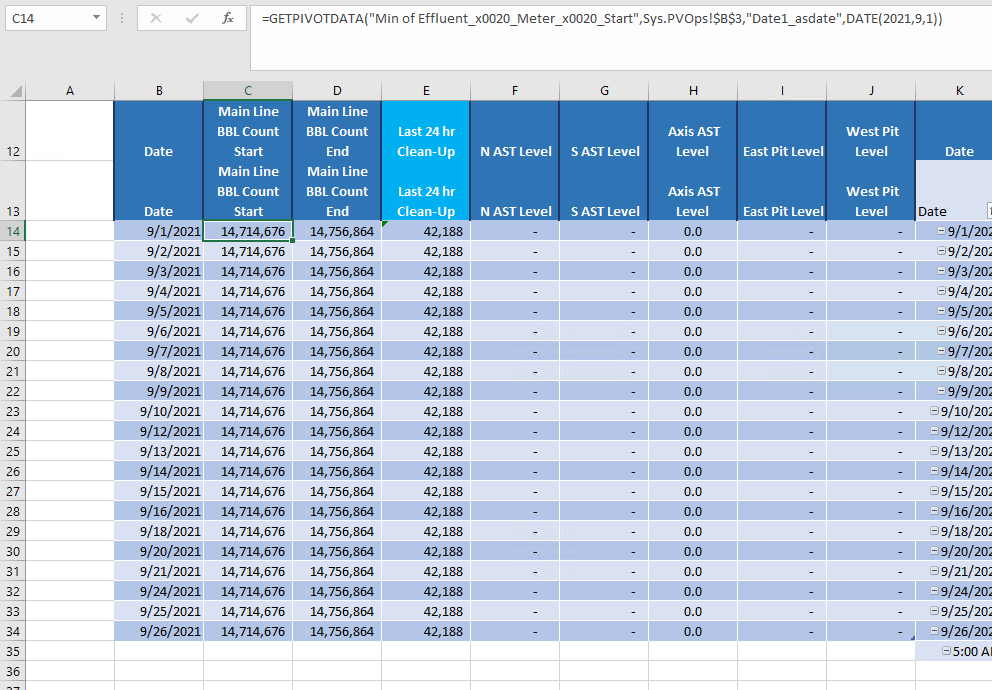
Using GETPIVOTDATA To fill separate sheet based on dynamic data tied to dates

 Sep 28, 2021SergeiBaklan
I figured it out
=GETPIVOTDATA("Min of Effluent_x0020_Meter_x0020_Start",Sys.PVOps!$B$3,"Date1_asdate",[@Date])
allows me to perform the function I wanted.
Thanks for your help
Best

Not sure I understood the question. If what to use here
when B14, B15, etc (reference on the cell in Date column).
- sconway1985Sep 27, 2021Brass ContributorHello Sergei,
Yes I think that end of the formula is what I need to edit. I need to reference not just that specific date with the formula. I need to have a formula that will autofill the remainder of the days.- SergeiBaklanSep 27, 2021Diamond Contributor
If you mean to repeat automatically calculations for all dates presented in PivotTable that's, I guess, with data model. For that first add data to data model creating creating PivotTable.
One way is generate DAX query for needed calculations with ADDCOLUMNS and / or SUMMARIZE Best Practices Using SUMMARIZE and ADDCOLUMNS - SQLBI , add this query to linked-back table Linkback Tables in PowerPivot for Excel 2013 - SQLBI . With that you have structured table within the grid based on data model table.
More modern way is as here Chris Webb's BI Blog: Excel Cube Functions, Dynamic Arrays And Lambdas, Part 2: Returning Tables Chris Webb's BI Blog (crossjoin.co.uk) but that's for insiders.
- sconway1985Sep 28, 2021Brass Contributor
I'm not sure I understand what you mean.
The data itself is input via PowerApp that feeds a SharePoint list. This list is then fed as raw data into a sheet within the book automatically and all I am doing is referencing the raw data to create the Pivot Table. Then I am referencing that Pivot Table from another sheet to create another table.