Forum Discussion

Using filter to populate cells from the bottom up.
- Jun 14, 2025
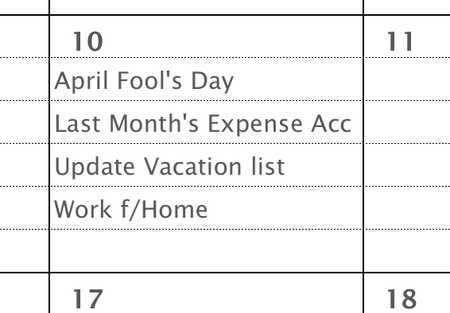
I think they want that day to fill from the bottom up so building on Sergei's:
=LET(
  f, FILTER(Dates!$H$4:$H$37,Dates!$G$4:$G$37=DAY(H9),""),
  r, 5,
  c, TAKE(VSTACK(f, EXPAND("",r,1,"")),r),
  SORTBY(c, SEQUENCE(r),-1 )
)
note this will also automatically clip the list off if there are more than r (i.e. 5) rows of items found so you won't get #SPILL ERROR!
If you want to have an indication that the list was clipped you can use:
=LET(
  f, FILTER(Dates!$H$4:$H$37,Dates!$G$4:$G$37=DAY(H9),""),
  r, 5,
  c, IF(ROWS(f)>r,VSTACK(TAKE(f,r-1),"[>"&r&" found]"),TAKE(VSTACK(f,EXPAND("",r,1,"")),r)),
  SORTBY(c, SEQUENCE(r),-1 )
)

I think they want that day to fill from the bottom up so building on Sergei's:
=LET(
  f, FILTER(Dates!$H$4:$H$37,Dates!$G$4:$G$37=DAY(H9),""),
  r, 5,
  c, TAKE(VSTACK(f, EXPAND("",r,1,"")),r),
  SORTBY(c, SEQUENCE(r),-1 )
)
note this will also automatically clip the list off if there are more than r (i.e. 5) rows of items found so you won't get #SPILL ERROR!
If you want to have an indication that the list was clipped you can use:
=LET(
  f, FILTER(Dates!$H$4:$H$37,Dates!$G$4:$G$37=DAY(H9),""),
  r, 5,
  c, IF(ROWS(f)>r,VSTACK(TAKE(f,r-1),"[>"&r&" found]"),TAKE(VSTACK(f,EXPAND("",r,1,"")),r)),
  SORTBY(c, SEQUENCE(r),-1 )
)

m_tarler:
Your first code snippet was the perfect response. Many thanks.
I have used LET before, but never realized it could assign an array of values to a variable.
TAKE, VSTACK, and EXPAND are new functions to me. Thank you for the introduction to them.