Forum Discussion

style3body
Jul 13, 2021Copper Contributor
User Input Outcome
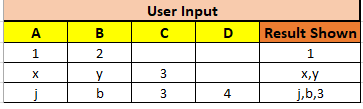
Dear All I hope you are having a great day first, I would like to thank you all for your effort I need your support regarding this issue: Device and OS platform, Windows 10 Excel p...
- Jul 13, 2021
Create the following function in a module in the Visual Basic Editor:
Function Res(rng As Range) As String
    Dim i As Long
    Dim s As String
    For i = 1 To Application.CountA(rng) - 1
        s = s & "," & rng(i).Value
    Next i
    If s <> "" Then
        Res = Mid(s, 2)
    End If
End Function
Let's say the first input range is A2:D2. In E2, enter the formula
=Res(A2:D2)This can be filled/copied down.

HansVogelaar
Jul 13, 2021MVP
Create the following function in a module in the Visual Basic Editor:
Function Res(rng As Range) As String
    Dim i As Long
    Dim s As String
    For i = 1 To Application.CountA(rng) - 1
        s = s & "," & rng(i).Value
    Next i
    If s <> "" Then
        Res = Mid(s, 2)
    End If
End Function
Let's say the first input range is A2:D2. In E2, enter the formula
=Res(A2:D2)This can be filled/copied down.

style3body
Nov 30, 2021Copper Contributor
Hello Again...
Kindly, What if I need like the following :
can you do that if possible?
Example 1
and also :
Example 2
Thank you in advance..
- HansVogelaarNov 30, 2021MVP
To specify a separator, use this function:
Function Result2(rng As Range, sep As String) As String
    Dim cel As Range
    Dim s As String
    For Each cel In rng
        If cel.Value <> "" Then
            s = s & sep & cel.Value
        End If
    Next cel
    If s <> "" Then
        Result2 = Mid(s, Len(sep) + 1)
    End If
End Function
Use like this:
=Result2(A2:D2,"-")
About your second request: do you want to specify the number of characters for each row? Or is there some kind of "rule" that determines the number of characters?