Forum Discussion

milo1234
May 27, 2021Brass Contributor
Unable to extract month from date
Hi, I have used the correct formula =TEXT(I2, "mmm") however the month is not being extracted from the date. The start date column has a data type of 'Date' and the Month column has a data type of 'C...
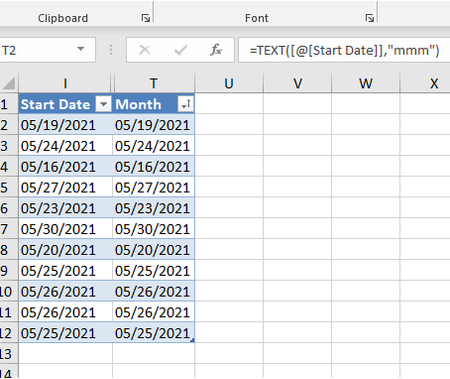
- May 27, 2021
Most probably Start Dates are texts which only looks like dates, not dates (which are actually numbers). The rest depends on which is default date format on your machine.
As variant you may transform texts to dates with Data->Text to Columns selecting MDY on third step.
Or
=TEXT( DATE(2021, LEFT([@[Start Date]],2), 1), "mmm")


milo1234
Jun 15, 2021Brass Contributor
HansVogelaar Hi, I have updated my data in the spreadsheet and when I go to Data > Text to Columns, the column changes the text to the actual formula.
Am I doing something wrong?

HansVogelaar
Jun 15, 2021MVP
Make sure the column is not formatted as Text.
If that is not the cause, make sure that the Show Formulas button on the Formulas tab of the ribbon is NOT highlighted.