Forum Discussion

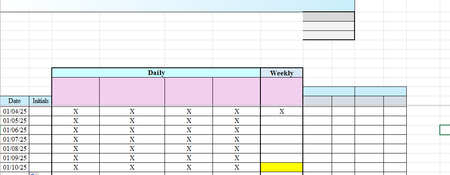
Trying to format a cell to highlight if it hasn't been checked off in 7 days.
- Jan 13, 2025
Yes - using the formula =AND(G11>G17<>"X")
But that will color all cells from G18 down in your sample workbook:

I couldn't get that to work. It just made all of the weekly cells turn yellow. I'm attaching a file so maybe you can figure out what I did wrong. Thanks!

My apologies - that's my fault. The rule should be of type 'Use a formula to determine which cells to format'. See the attached version.
- Sharon_Dquest1Jan 12, 2025Tin Contributor
Is there any way to only make the G cell yellow if there hasn't been an "X" in the G column in the previous seven days? Thanks!
- HansVogelaarJan 13, 2025MVP
Yes - using the formula =AND(G11>G17<>"X")
But that will color all cells from G18 down in your sample workbook:
- Sharon_Dquest1Jan 14, 2025Tin Contributor
I just added a rule if "B18=""" to clear the yellow and that works. Thank you!
- Sharon_Dquest1Jan 11, 2025Tin Contributor
Is there any way for me to have it ONLY turn yellow if there hasn't been an X in the previous 7 "G" column cells or within a week? Thanks so much!