Forum Discussion

Trying to format a cell to highlight if it hasn't been checked off in 7 days.
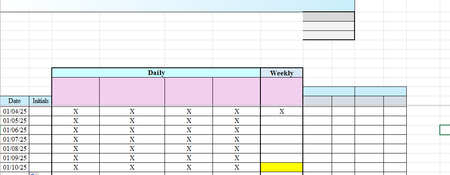
- Jan 13, 2025
Yes - using the formula =AND(G11>G17<>"X")
But that will color all cells from G18 down in your sample workbook:

Select G18 and down as far as you want/need.
G18 should be the active cell in the selection.
On the Home tab of the ribbon, click Conditional Formatting > New Rule...
Select 'Format only cells that contain'.
Leave the first drop down set to 'Cell Value'.
Select 'less than or equal to' from the second drop down.
In the box next to it, enter the formula
=AND($B18<>"", $C18:$F18="X", $G18="")
Click Format...
Activate the Fill tab.
Select a fill color.
Click OK, then click OK again.
 Sharon_Dquest1Jan 10, 2025Tin Contributor
I couldn't get that to work. It just made all of the weekly cells turn yellow. I'm attaching a file so maybe you can figure out what I did wrong. Thanks!
- HansVogelaarJan 10, 2025MVP
My apologies - that's my fault. The rule should be of type 'Use a formula to determine which cells to format'. See the attached version.
- Sharon_Dquest1Jan 12, 2025Tin Contributor
Is there any way to only make the G cell yellow if there hasn't been an "X" in the G column in the previous seven days? Thanks!