Forum Discussion

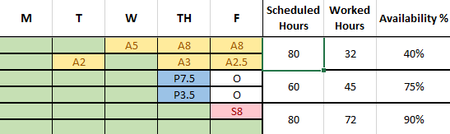
Trying to calculate sum with letter in the front
- Sep 09, 2022
Lucy_McMahon The attached is one option. I used 10*countif("O") to adjust from 80 to 60 hours but that is obviously very case specific to this case. Then I use a subtraction. Note I also formatted it all as a table so all the formulas autofill all the rows (instead of an array formula) but could be reformatted not using a table. I also added conditional formatting to automatically color those columns based on the letter entered (or blank) but only had a subset at the time.

a simple answer to how to get numbers after 1 letter is = --mid(A1,2,99)
but you will get errors and stuff and probably need to add IFERROR() around it and still do something about that "O" I suspect.

The O is for off. Those people only work for 60 hours a week. If I can get the formula for 80 hours I can just adjust it for 60. Those 2 cells that say O won't be included in the range.
- mathetesSep 09, 2022Gold Contributor
To follow up with Matt's suggestions, he's right, first, to recommend against merged cells (they can look nice to humans viewing the spreadsheet, but can have unintended negative consequences when it comes to spreadsheet performance). The idea of taking two weeks and laying them out horizontally is very viable, would put each employee on one row, giving a different kind of clarity.
I suspect, further, that he and I would both recommend against making a modified formula to handle the 60 hour weeks of those who have (in the example you posted) Friday's off. What you want is a single formula that has been tested for accuracy and that handles all cases, all types of leave, all types of work weeks.
Having worked in my professional career (retired now for almost exactly 20 years) I worked several years as director of the HR/Payroll database of a major corp. So this kind of data and the processing of it was an everyday matter.
So to help us help you come up with a layout and viable formula(s) that cover the range of situations, would you be willing to spell out the various codes (types of leave) and the rules around them if they're in any way different from just adding up hours so coded.
I'm assuming in this case we're dealing with bi-weekly payroll, right?
Would it be helpful to have a range of cells that clearly spells out for each employee, for each bi-weekly period:
- Hours scheduled
- Hours worked
- Hours on Leave type A
- Hours on Leave type B.... (etc)
- Other hours (please be specific)
- Lucy_McMahonSep 09, 2022Tin Contributor
If it will be helpful, I can put each person on one row with 10 columns, instead of how it is currently. It would take while as I have 28 sheets with 35 or so people that are already filled in with the data to avoid the merged cells. Then I can use array formulas. The letters are already coded but are only consequential in the YTD calculations:
- mathetesSep 09, 2022Gold Contributor
It would take while as I have 28 sheets with 35 or so people
This could be a minor diversion, but I need to ask about it.
I'm a believer in keeping to single databases in Excel unless there are compelling data processing reasons to do otherwise. We often come across people here in the forum who have arranged workbooks with separate sheets to represent, say, different departments, or different product lines. It makes sense to do that when we're working with paper ledger sheets; it helps us as humans keep things organized and clear. But when it comes to the computer, when it comes to Excel, that kind of organization can actually get in the way of some of Excel's remarkable abilities to summarize and work with data.
Given the number 28 in your case, I'm going to make a guess that you have a separate sheet for each pay-period, allowing for a week of overlap each--with the prior year and the following year. It's a guess. Maybe there's another reason. Again, unless there's a compelling reason to do it that way, I'd recommend making all of those sheets into one large table, just adding a column to reflect which pay period each row represents. It will then be a lot easier to do such things as weekly comparisons, annual summaries of leaves by type, by employee, etc.
As I said at the start, this may just be a minor diversion, but asking the question is part of what I do as a "consultant" in this case. I don't want just to answer your presenting question about formulas; I also want to make sure you're using Excel to its maximum capabilities.
- mtarlerSep 09, 2022Silver ContributorSo if someone has an "O" that means they only work 4 days for 7.5 hrs/day instead of 8hrs/day?
- Lucy_McMahonSep 09, 2022Tin Contributorcorrect
- mathetesSep 09, 2022Gold Contributor
Wha?! Wait!! Where did 7.5 hour days come from? I thought we were dealing with 8 hour days!
