Forum Discussion

Trying to calculate sum with letter in the front
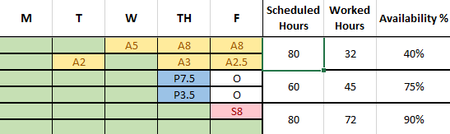
- Sep 09, 2022
Lucy_McMahon The attached is one option. I used 10*countif("O") to adjust from 80 to 60 hours but that is obviously very case specific to this case. Then I use a subtraction. Note I also formatted it all as a table so all the formulas autofill all the rows (instead of an array formula) but could be reformatted not using a table. I also added conditional formatting to automatically color those columns based on the letter entered (or blank) but only had a subset at the time.

Yes, the letters indicate different kinds of leave. The letters are not essential for this calculation but are used elsewhere so I can't remove them. We are tabulating data on each kind of leave used but I need the two week period to calculate the hours correctly first. The formula is inaccurate for what I have so far.
This is because each green cell has the number 8 in the same color text at the fill to default a full 8 hour workday. Any entry in the B:F columns -as of right now- substracts the default 8 from the sum. Which works fine if someone took the whole day off. But I ran into the problem with partial requests (i.e. A1.5). This file was only being used for my own ease of access for timecard processing so I was just doing the math manually should a partial day off occur. But the powers that be have seen it and want me to expand the usage. So now I need to find a way for it to accurately calculate so I don't have to manually subtract the leave taken from the 80 hour work week for all 40 people in our department.
I am perfectly happy to remove the default 8 in the B:F columns if I can figure out a way to sum the H column correctly. For ease, the H column would look like =80-sum(complicated formula to ignore text in cell range and tabulate numbers in range), The cells with no leave entries would just be green but with no hidden numerical data. Ideally I wouldn't need an additional column for the output as in extracting the value. I was trying to figure out an array formula but the cell is merged so it won't work with it as.
