Forum Discussion

Trying to calculate sum with letter in the front
- Sep 09, 2022
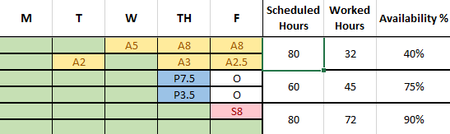
Lucy_McMahon The attached is one option. I used 10*countif("O") to adjust from 80 to 60 hours but that is obviously very case specific to this case. Then I use a subtraction. Note I also formatted it all as a table so all the formulas autofill all the rows (instead of an array formula) but could be reformatted not using a table. I also added conditional formatting to automatically color those columns based on the letter entered (or blank) but only had a subset at the time.


It's fairly easy to extract the value, as a number, from a text field like A5 or P3.5. Here's a formula that will do that for a combination in cell A3. [Note: I've made an assumption here that there is always only ONE single letter before the numbers, no matter how many numbers.]
=VALUE(RIGHT(A3,LEN(A3)-1))
See the attached spreadsheet.
But note, this is just a small part of what you're asking in your original post. I still would want to understand the big picture into which this small part of the puzzle is to fit.