Forum Discussion

jdogg29
Mar 16, 2023Brass Contributor
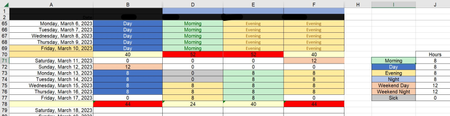
Trying to assign a number value to non-numerical value but still display the text not number
I am working on a timesheet and I need the cells to show the text like "Morning, Evening, Night" etc but the cell needs to have a numerical value but still show the text, not the value. The numerical...

jdogg29
Mar 17, 2023Brass Contributor
They want the user to enter the non-numerical text like "Morning, Evening, Night" and then it will show that on the main page, but when the VLOOKUP is used on the second tab, it puts the corresponding number like 8, 12

Hecatonchire
Mar 17, 2023Iron Contributor
try
=IFERROR(VLOOKUP(VLOOKUP(D4,Schedule!A72:B126,2,FALSE),Schedule!$I$71:$J$77,2,FALSE),"")
The blue function find "Morning" or "Evening" or "Night"...
The red convert "Morning" in 8 for exemple
I may not have understood
- jdogg29Mar 17, 2023Brass Contributor
how am I able to use the VLOOKUP with columns that are not beside each other?
I have this working because the columns are beside each other,
=IFERROR(VLOOKUP(VLOOKUP(D3,Schedule!A71:B125,2,FALSE),Schedule!$I$71:$J$78,2,FALSE),"")but I also need it to work for column D, E and F by the date. There are other columns between the date column (A) and the other ones (D, E and F)
- HecatonchireMar 17, 2023Iron Contributor
You can switch Vlookup with Xlookup
XLOOKUP vs VLOOKUP in Excel - What's the Difference? (goskills.com)
- jdogg29Mar 17, 2023Brass ContributorTHIS WORKS!! Thank you!