Forum Discussion

Transposing data related to same ID in row
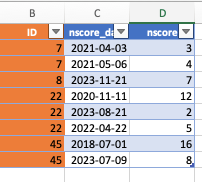

=HSTACK(UNIQUE(Tabelle7[ID]),IFERROR(DROP(
REDUCE("",SEQUENCE(ROWS(UNIQUE(Tabelle7[ID]))),
LAMBDA(x,y,VSTACK(x,TOROW(FILTER(Tabelle7[[nscore]:[score]],Tabelle7[ID]=
INDEX(UNIQUE(Tabelle7[ID]),y)))))),1),""))
This returns the intended output in my Excel for the web sheet. The name of the table in this example is "Tabelle7". You can replace this name with the name of your table.
 accountantbotDec 20, 2024Copper Contributor
Is there a way to add more columns? I'm not that good at excel but I basically have data with multiple ids and different entries. I'm unsure how to account for the extra columns of data.
- OliverScheurichDec 23, 2024Gold Contributor
Does this return the expected result?
=HSTACK(UNIQUE(Tabelle7[ID]),IFERROR(DROP(
REDUCE("",SEQUENCE(ROWS(UNIQUE(Tabelle7[ID]))),
LAMBDA(x,y,VSTACK(x,TOROW(FILTER(Tabelle7[[nscore]:[time]],Tabelle7[ID]=
INDEX(UNIQUE(Tabelle7[ID]),y)))))),1),""))The only change (in row 3 of the formula) is this
Tabelle7[[nscore]:[time]]
instead of that
Tabelle7[[nscore]:[score]] .