Forum Discussion

bpnelms
Aug 17, 2022Copper Contributor
Transpose or ??
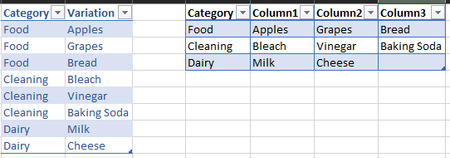
This is probably a simple thing, but I haven't found anything that works. It's similar to transpose, but not really. So basically I need the table on the left of the screenshot converted into the t...

Lorenzo
Aug 17, 2022Silver Contributor
(EDITED: Added Option3 that's almost all done with the UI/Menus)
With Power Query
2 options in attached file. Option1_1 is a variation of Option1, in case you hit performance issue with the latter
Option1:
let
    Source = Excel.CurrentWorkbook(){[Name="Table1"]}[Content],
    GroupedRows = Table.Group(Source, {"Category"},
        {"DATA", each
            Table.FromRows(
                { {Table.FirstValue(_)} & [Variation] }
            ),
            type table
        }
    ),
    CombinedTables = Table.Combine(GroupedRows[DATA])
in
    CombinedTables

bpnelms
Aug 18, 2022Copper Contributor
Maybe I missed it, but I don't see the different options in the file. Thanks
- LorenzoAug 18, 2022Silver Contributor
I only loaded Option1 to the sheet. All others are Connections only. To load them to sheets:
- Go to the Data tab > Queries & Connections (the corresponding pane opens)
- Right-click on each where you see Connection only below its name > Load To... > Table > OK