Forum Discussion

Melvin_Khoo
Dec 03, 2022Copper Contributor
Transforming data using new array shaping formula in excel
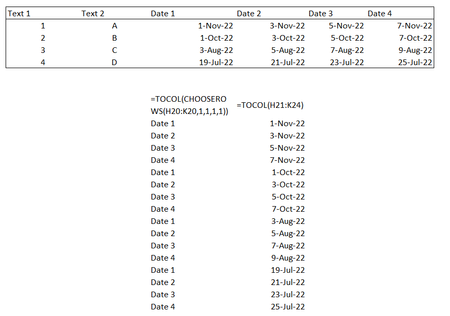
Hello Community, I'm transforming a set of data into tabular form with the new array shaping formula such as vstack, tocol, chooserow and so forth This is how my data set looks like Te...

OliverScheurich
Dec 03, 2022Gold Contributor
An alternative could be Power Query. In the attached file you can enter data in the large blue dynamic table. Then you can enter the number of rows in the small blue dynamic table. In my understanding the number of rows is always the same as the number of columns with dates in your data. For example 5 columns "Date1" to "Date 5" and 5 rows 1,2,3,4 and 5 in column "Text 1". You can then click in any cell of the green table and right-click with the mouse. Then you can select refresh to update the green result table. The green table and the small blue table can be dragged to the right according to the requirements.