Forum Discussion

ahmerac
Dec 28, 2024Tin Contributor
Transform multiple date ranges into continuous dates list through Dynamic Array
Hi Excel experts, I have data in a table format with StartDate, EndDate, and Amount columns. The data needs to be transformed into an output format that consists of Date and Amount Per Day columns, ...
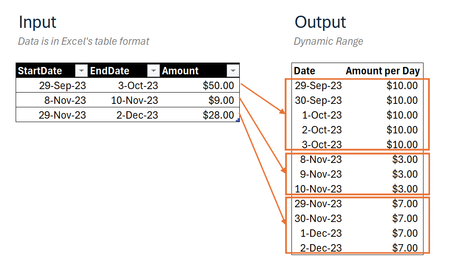
 Dec 31, 2024
=DROP(REDUCE("",SEQUENCE(ROWS(Input)),LAMBDA(u,v,
LET(
_days,INDEX(Input,v,2)-INDEX(Input,v,1)+1,
_seq,SEQUENCE(_days,1,INDEX(Input,v,1)),
_amt,EXPAND(INDEX(Input,v,3)/_days,_days,1,INDEX(Input,v,3)/_days),
VSTACK(u,HSTACK(_seq,_amt))))),1)This returns the expected result in my Excel for the web sheet. The name of the input table is "Input".
Can you share your M-code that achieves the same result?

djclements
Dec 31, 2024Silver Contributor
Another option you could try with your sample file:
=LET(
    beg, Table1[StartDate],
    end, IF(ISBLANK(Table1[EndDate]),beg,Table1[EndDate]),
    dur, end-beg+1,
    amt, Table1[Amount]/IF(dur>0,dur,1),
    seq, SEQUENCE(,MAX(end)-MIN(beg)+1,MIN(beg)),
    tst, (seq>=beg)*(seq<=end),
    HSTACK(TOCOL(IFS(tst,seq),2),TOCOL(IFS(tst,amt),2))
)
Or perhaps:
=LET(
    beg, Table1[StartDate],
    end, IF(ISBLANK(Table1[EndDate]),beg,Table1[EndDate]),
    dur, end-beg+1,
    amt, Table1[Amount]/IF(dur>0,dur,1),
    seq, SEQUENCE(,MAX(dur),0),
    tst, dur>seq,
    HSTACK(TOCOL(IFS(tst,beg+seq),2),TOCOL(IFS(tst,amt),2))
)
ahmerac
Jan 01, 2025Tin Contributor
Both options worked perfectly. Thank you, djclements.