Forum Discussion

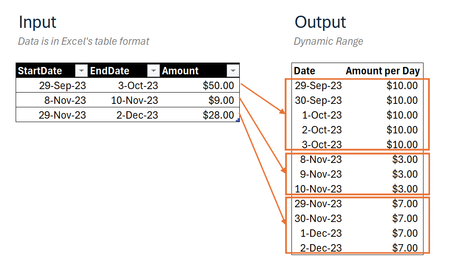
Transform multiple date ranges into continuous dates list through Dynamic Array
 Dec 31, 2024
=DROP(REDUCE("",SEQUENCE(ROWS(Input)),LAMBDA(u,v,
LET(
_days,INDEX(Input,v,2)-INDEX(Input,v,1)+1,
_seq,SEQUENCE(_days,1,INDEX(Input,v,1)),
_amt,EXPAND(INDEX(Input,v,3)/_days,_days,1,INDEX(Input,v,3)/_days),
VSTACK(u,HSTACK(_seq,_amt))))),1)This returns the expected result in my Excel for the web sheet. The name of the input table is "Input".
Can you share your M-code that achieves the same result?
=DROP(REDUCE("",SEQUENCE(ROWS(Input)),LAMBDA(u,v,
LET(
_days,INDEX(Input,v,2)-INDEX(Input,v,1)+1,
_seq,SEQUENCE(_days,1,INDEX(Input,v,1)),
_amt,EXPAND(INDEX(Input,v,3)/_days,_days,1,INDEX(Input,v,3)/_days),
VSTACK(u,HSTACK(_seq,_amt))))),1)
This returns the expected result in my Excel for the web sheet. The name of the input table is "Input".
Can you share your M-code that achieves the same result?

Your solution worked flawlessly. Thank you, Oliver.
Here is my M code:
let
    Source = Excel.CurrentWorkbook(){[Name="Table1"]}[Content],
    //transformDates
    a = Table.CombineColumns( Source,
        { "StartDate" , "EndDate" },
        each { Number.From( _{0} ) .. Number.From( _{1} ) },
        "Dates"
    ),
    // transformAmounts
    b = Table.ReplaceValue( a,
        each [Amount] ,
        each [Amount] / List.Count( [Dates] ) ,
        Replacer.ReplaceValue,
        {"Amount"}
    ),
    //expandDates
    c = Table.ExpandListColumn(b, "Dates"),
    //changeTypes
    d = Table.TransformColumnTypes(c,
        {{"Dates", type date}, {"Amount", type number}}
    )
in
    d