Forum Discussion

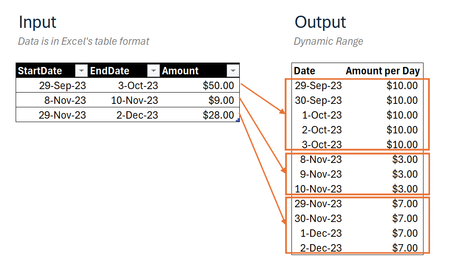
Transform multiple date ranges into continuous dates list through Dynamic Array
 Dec 31, 2024
=DROP(REDUCE("",SEQUENCE(ROWS(Input)),LAMBDA(u,v,
LET(
_days,INDEX(Input,v,2)-INDEX(Input,v,1)+1,
_seq,SEQUENCE(_days,1,INDEX(Input,v,1)),
_amt,EXPAND(INDEX(Input,v,3)/_days,_days,1,INDEX(Input,v,3)/_days),
VSTACK(u,HSTACK(_seq,_amt))))),1)This returns the expected result in my Excel for the web sheet. The name of the input table is "Input".
Can you share your M-code that achieves the same result?

It is reasonably easy to distribute one payment over a period, but life gets much harder when, as in this case, there are multiple amounts. This is because Microsoft implemented the helper functions such as MAP and SCAN on the assumption that a scalar value would be returned at each step. Whenever you need to return an array at each step, Excel will throw a #CALC! error. ☹️
OliverScheurichhas addressed this by calling REDUCE to accumulate a growing array of array results using VSTACK (his calculation is included within attached the workbook). I have used a more complicated approach, but the complexity is hidden within the function MAPλ. For small problems my approach shows little advantage except, perhaps, by hiding complexity. For larger problems ~1000+ values, the approach has been found to be 10x faster than REDUCE/VSTACK.
The final calculation takes things a step further by grouping amounts by date and summing any overlaps.
=LET(
    DISTRIBUTEλ, LAMBDA(startLst, endLst, amount,
        LET(
            duration, 1 + endLst - startLst,
            day, SEQUENCE(duration, 1, startLst),
            amt, IF(day, amount / duration),
            HSTACK(day, amt)
        )
    ),
    stacked, MAPλ(Table1[StartDate], Table1[EndDate], Table1[Amount], DISTRIBUTEλ),
    dates, TAKE(stacked, , 1),
    amounts, TAKE(stacked, , -1),
    GROUPBY(dates, amounts, SUM)
)
 ahmeracJan 01, 2025Tin Contributor
Very insightful! Thank you for the solutions and the detailed explanation regarding formula performance.