Forum Discussion

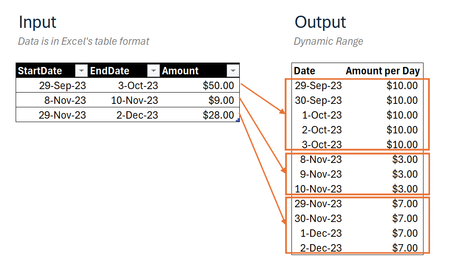
Transform multiple date ranges into continuous dates list through Dynamic Array
 Dec 31, 2024
=DROP(REDUCE("",SEQUENCE(ROWS(Input)),LAMBDA(u,v,
LET(
_days,INDEX(Input,v,2)-INDEX(Input,v,1)+1,
_seq,SEQUENCE(_days,1,INDEX(Input,v,1)),
_amt,EXPAND(INDEX(Input,v,3)/_days,_days,1,INDEX(Input,v,3)/_days),
VSTACK(u,HSTACK(_seq,_amt))))),1)This returns the expected result in my Excel for the web sheet. The name of the input table is "Input".
Can you share your M-code that achieves the same result?

- Assume your data is in columns A, B, and C:
- StartDate in column A
- EndDate in column B
- Amount in column C
- Create a list of all dates within the ranges:
- In a new column, use the following formula to generate a list of all dates:
This formula creates a sequence of dates from the earliest start date to the latest end date.=SEQUENCE(MAX(B:B) - MIN(A:A) + 1, 1, MIN(A:A), 1)
- In a new column, use the following formula to generate a list of all dates:
- Calculate the amount per day for each date:
- In another new column, use the following formula to calculate the amount per day for each date:
=SUMPRODUCT((A:A<=D2)*(B:B>=D2)*(C:C/(B:B-A:A+1)))Here, D2 is the cell reference for the first date in your sequence. This formula checks if each date falls within the start and end dates and then divides the amount by the number of days in the range.
- In another new column, use the following formula to calculate the amount per day for each date:
- Combine the results:
- You can now have a table with the dates and the corresponding amounts per day.
Here's a more detailed example:
| StartDate | EndDate | Amount | Date | Amount Per Day |
|---|---|---|---|---|
| 2024-01-01 | 2024-01-03 | 300 | 2024-01-01 | 100 |
| 2024-01-02 | 2024-01-04 | 200 | 2024-01-02 | 150 |
| 2024-01-03 | 150 | |||
| 2024-01-04 | 50 |
- Column D (Date) is generated using the SEQUENCE formula.
- Column E (Amount Per Day) is calculated using the SUMPRODUCT formula.
 ahmeracJan 01, 2025Tin Contributor
I appreciate your answer, Kidd_Ip. In general, it works, but it will require some additional steps from the user to achieve the expected result, namely:
- The date list will show those dates that are not part of the provided ranges.
- The amount column is not dynamic.