Forum Discussion

Top n vs. Others in Excel
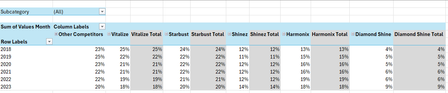
- Feb 04, 2026
Thank you very much for providing the full context. Looking at the chart I better understand what Your challenge was 🤔
The attached option uses the same approach we've been discussing these last days. In summary:
- TableSource is filtered by the Slicer(s)
- PIVOTBY calc. the %age by [Year] & [Brand] relative to the Row Total. Data are sorted DESC according to [Brand] "best Total"
- The formula (below):
- Takes the PIVOTBY resulting array to Group [Brand] above - if any - the TOPN parameter
- Padds the [Brand] left with the appropriate number of Zero Width Space chars. to ensure [Brand] will be ordered according to there rank in the PivotTable & Chart, with [Grouped Brand] always as the last [Brand] whatever its rank is
- Unpivots the data as a single array that's used as PivotTable Data Source
PivotTable
- [Brand] must be sorted A-Z
- Until MSFT releases the PivotTable Auto Refresh functionality, any change on the Slicer(s) requires a Refresh of the PivotTable
Side effect of the Zero Width Spaces
- None on screen
- According to my researches none on printing - to be checked though...
- [Brand] on PivotTable/Chart <> TableSource[Brand]*
* I will provide more information on a separate post later
Formula
I did my best to make the variable names as clear as possible and decomposed as much as possible - any question let me know:
// Source_PivotTable
=LET(
  TOPN_value,         IF( ISBLANK( SETTINGS!TOPN_Default ), 5, SETTINGS!TOPN_Default ),
  GROUPED_BrandName,  IF( ISBLANK( SETTINGS!TOPN_GROUPED_Names ), "Other Brands", SETTINGS!TOPN_GROUPED_Names ),

  pivotedAllBrands,
    PIVOTBY(
      TableSource[Year], TableSource[Brand], TableSource[Values Month],
      PERCENTOF,
      0, 0, 1, 0, -2,
      TableSource[NOT_Filtered],
      1
    ),

  OtherBrand_Exists?,           COLUMNS( pivotedAllBrands) -1 > TOPN_value,
  groupedOtherBrand_If_Exists,
    IF( OtherBrand_Exists?,
      LET(
          TopnBrand_series,     CHOOSECOLS( pivotedAllBrands, SEQUENCE(, TOPN_value, 2 ) ),
          TopnBrand_values,     DROP( TopnBrand_series, 1 ),
          GroupedBrand_values,  BYROW( TopnBrand_values, LAMBDA(rw, 1 -SUM(rw) ) ),
          AllBrand_series,      VSTACK(
                                  HSTACK( TAKE( TopnBrand_series, 1 ), GROUPED_BrandName ),
                                  HSTACK( TopnBrand_values, GroupedBrand_values )
                                ),
          AllBrand_series
      ),
      pivotedAllBrands
    ),

       prep_UnPivoting_BEG,  "------------------------------------------------------",
            LeftCol_ToDrop,   --NOT( OtherBrand_Exists? ),
                brandNames,   DROP( TAKE( groupedOtherBrand_If_Exists, 1 ),, LeftCol_ToDrop ),
                brandCount,   COLUMNS( brandNames ),
           brandRanks_Desc,   SEQUENCE(, brandCount, brandCount, -1 ),
          paddedBrandNames,   REPT( UNICHAR(8203), brandRanks_Desc ) & brandNames,
                     years,   DROP( TAKE( pivotedAllBrands,, 1 ), 1 ),
                    values,   DROP( groupedOtherBrand_If_Exists, 1, LeftCol_ToDrop ),
            valuesNotBlank,   NOT( ISBLANK( values ) ),
       prep_UnPivoting_END,  "------------------------------------------------------",

    UnPivotedData,
      LET(
        UnPivot,            LAMBDA(array, TOCOL( IF( valuesNotBlank, array ) ) ),
        UnPivoted_years,    UnPivot( years ),
        UnPivoted_brands,   UnPivot( paddedBrandNames ),
        UnPivoted_values,   TOCOL( values ),
        HSTACK( UnPivoted_years, UnPivoted_brands, UnPivoted_values )
      ),

  VSTACK( {"Year", "Brand", "Value"}, UnPivotedData )
)
Cheers
Lz.

Hi Lorenzo,
Ah thank you so much! You've truly been such an amazing contributor and sole problem solver on this challenge. I can't thank you enough. This wasn't easy 😅. You've been so willing to help and you persisted until you found better solutions, and that's more than I could have ever asked for. If I could mark more than one approach as a solution, believe me I would. You really deserve it, given all your time and efforts.
Nevertheless, I've truly learnt a lot from you in this challenge and it gave me a newfound interest for advanced Excel 😁.
This is going to be a bit long, but let me take you through my thought process and why I was wanting a solution like the one we've been working on.
In this image (prior to me coming here), the chart originally looked like this, (without any grouping)... Now, this chart looked very cluttered and we wouldn't be able to distinguish or compare any brands visually below 2-3% for example. Even greying out the bottom didn't seem to do much justice here, and it just looked a bit distracting.
The goal for this study was to see how these Shampoo brands market share evolved over time. One specific supplier, has 2 brands (Shinez and Starbust). These 2 brands are most important to me, because I'm doing a Net Revenue Management study for a fictional supplier called HealthMax.
After completing my analysis, I realised that Shinez and Starbust were consistently in the Top 5 brands for each region (Center, North & South) and in all regions (when no filter/slicer selection is made).
To improve the visual and UX, I thought it might be better to show the individual Top 5 brands evolution over time (years) vs. "Other brands" (remaining 20 brands). In this way, we still have the goal in mind except, instead of looking at all 25 brands on a single visual (like the image above), it would make sense to compare HealthMax's (Shinez and Starbust) brands performance against and it's closest competitors brands (HealthMax's brands + Top 3 competitor brands to make Top 5) vs. "other brands" who hold very little to no market share.

Thank you very much for providing the full context. Looking at the chart I better understand what Your challenge was 🤔
The attached option uses the same approach we've been discussing these last days. In summary:
- TableSource is filtered by the Slicer(s)
- PIVOTBY calc. the %age by [Year] & [Brand] relative to the Row Total. Data are sorted DESC according to [Brand] "best Total"
- The formula (below):
- Takes the PIVOTBY resulting array to Group [Brand] above - if any - the TOPN parameter
- Padds the [Brand] left with the appropriate number of Zero Width Space chars. to ensure [Brand] will be ordered according to there rank in the PivotTable & Chart, with [Grouped Brand] always as the last [Brand] whatever its rank is
- Unpivots the data as a single array that's used as PivotTable Data Source
PivotTable
- [Brand] must be sorted A-Z
- Until MSFT releases the PivotTable Auto Refresh functionality, any change on the Slicer(s) requires a Refresh of the PivotTable
Side effect of the Zero Width Spaces
- None on screen
- According to my researches none on printing - to be checked though...
- [Brand] on PivotTable/Chart <> TableSource[Brand]*
* I will provide more information on a separate post later
Formula
I did my best to make the variable names as clear as possible and decomposed as much as possible - any question let me know:
// Source_PivotTable
=LET(
  TOPN_value,         IF( ISBLANK( SETTINGS!TOPN_Default ), 5, SETTINGS!TOPN_Default ),
  GROUPED_BrandName,  IF( ISBLANK( SETTINGS!TOPN_GROUPED_Names ), "Other Brands", SETTINGS!TOPN_GROUPED_Names ),

  pivotedAllBrands,
    PIVOTBY(
      TableSource[Year], TableSource[Brand], TableSource[Values Month],
      PERCENTOF,
      0, 0, 1, 0, -2,
      TableSource[NOT_Filtered],
      1
    ),

  OtherBrand_Exists?,           COLUMNS( pivotedAllBrands) -1 > TOPN_value,
  groupedOtherBrand_If_Exists,
    IF( OtherBrand_Exists?,
      LET(
          TopnBrand_series,     CHOOSECOLS( pivotedAllBrands, SEQUENCE(, TOPN_value, 2 ) ),
          TopnBrand_values,     DROP( TopnBrand_series, 1 ),
          GroupedBrand_values,  BYROW( TopnBrand_values, LAMBDA(rw, 1 -SUM(rw) ) ),
          AllBrand_series,      VSTACK(
                                  HSTACK( TAKE( TopnBrand_series, 1 ), GROUPED_BrandName ),
                                  HSTACK( TopnBrand_values, GroupedBrand_values )
                                ),
          AllBrand_series
      ),
      pivotedAllBrands
    ),

       prep_UnPivoting_BEG,  "------------------------------------------------------",
            LeftCol_ToDrop,   --NOT( OtherBrand_Exists? ),
                brandNames,   DROP( TAKE( groupedOtherBrand_If_Exists, 1 ),, LeftCol_ToDrop ),
                brandCount,   COLUMNS( brandNames ),
           brandRanks_Desc,   SEQUENCE(, brandCount, brandCount, -1 ),
          paddedBrandNames,   REPT( UNICHAR(8203), brandRanks_Desc ) & brandNames,
                     years,   DROP( TAKE( pivotedAllBrands,, 1 ), 1 ),
                    values,   DROP( groupedOtherBrand_If_Exists, 1, LeftCol_ToDrop ),
            valuesNotBlank,   NOT( ISBLANK( values ) ),
       prep_UnPivoting_END,  "------------------------------------------------------",

    UnPivotedData,
      LET(
        UnPivot,            LAMBDA(array, TOCOL( IF( valuesNotBlank, array ) ) ),
        UnPivoted_years,    UnPivot( years ),
        UnPivoted_brands,   UnPivot( paddedBrandNames ),
        UnPivoted_values,   TOCOL( values ),
        HSTACK( UnPivoted_years, UnPivoted_brands, UnPivoted_values )
      ),

  VSTACK( {"Year", "Brand", "Value"}, UnPivotedData )
)
Cheers
Lz.
- LorenzoFeb 09, 2026Silver Contributor
Hi Anonymous29007
A friend of mine with a different issue is also concerned about the unavailability of the Pivot Auto Refresh functionality. In the meantime she wanted a visual flag to remind users to Refresh the PivotTable when required. It's been implemented with a Green/Red icon above the PivotTable:Due to the hack we put in place to sort the [Brand] as expected on the PivotTable the above solution requires a little customization. Before I spend time on this, are you interested?
If you are I need to know if you made changes - other than updating your data in TableSource - to the last wbook I shared (PivotChart_v2).
Let me know…
Lz.- Anonymous29007Feb 12, 2026Brass Contributor
Hi Lorenzo ,
I'm so sorry for responding late. This didn't show up in my notifications and it only came in my email today.
Yes, I'd love to learn more about this. In fact I was thinking about the Pivot Auto refresh earlier this week and I think it would be a great idea to have some visual cue reminding the user to refresh.
I haven't made any changes to the workbook (PivotChart_v2) that you sent.
Definitely eager to learn more...
Best regards,
YP
- LorenzoFeb 12, 2026Silver Contributor
Hi Anonymous29007 / YP
I'm so sorry for responding late. This didn't show up in my notifications
No worries at all (this site currently bugs on file attachments & notifications)
- Defined Name 'PivotBrands' that refers to the top-left cell of the PivotTable (also renamed PivotBrands)
- For clarity/alignment, renamed 'Source_PivotTable' as 'Source_PivotBrands'
- On CALCS!F4 an on-sheet LAMBDA named 'PivotBrands_Refresh_Status'
- (Done on UI sheet) Wherever you want enter =PivotBrands_Refresh_Status & copy/paste special the format* (only) from CALCS!F4 (* Conditional Format w/Icon Set)
NB: this doesn't prevent you from renaming the sheets
PivotBrands_Refresh_Status:
=LAMBDA(pivot_table,pivot_data_source,
  LET(
    ASSUMPTION_1,   "Only 1 row_field and only 1 column field in 'DataSource' are Pivoted.",
    ASSUMPTION_2,   "The same 'col_field_name' is used in 'DataSource' & 'pivot_data_source'.",

    Pivoted_DataSource,
      LET(
         PivotSource_array, DROP(pivot_data_source, 1),
                   pivoted, PIVOTBY( CHOOSECOLS(PivotSource_array, 1), CHOOSECOLS(PivotSource_array, 2), CHOOSECOLS(PivotSource_array, 3),
                             SUM, 0, 0, 1, 0, -2
                            ),
           SPECIFIC_CUSTOM, "Actual pivot_table Headers are preceded w/Zero Width Spaces to push 'TOPN_GROUPED_Names' at end.",
           cleaned_headers, SUBSTITUTE( TAKE(pivoted, 1), UNICHAR(8203), ""),
             initial_order, SEQUENCE(, COLUMNS(pivoted) ),
              custom_order, IF( cleaned_headers = SETTINGS!TOPN_GROUPED_Names, MAX(initial_order), initial_order -1),
         SORTBY( pivoted, custom_order )
      ),
    Row_fields_count, ROWS(Pivoted_DataSource) -1,

    Col_fields_count,
      LET(
                 DataSource,  TableSource[#All],
               data_headers,  TAKE(DataSource, 1),
        data_col_field_name,  INDEX(pivot_data_source, 1, 2),
       data_col_field_index,  XMATCH(data_col_field_name, data_headers),
       ROWS( UNIQUE( CHOOSECOLS( DROP(DataSource, 1), data_col_field_index) ) )
      ),

   PivotTableAs_array,
     LET(
         PivotStart_address,  CELL("address", pivot_table),
            pivot_start_row,  VALUE( REGEXEXTRACT(PivotStart_address, "(?<=\$)\d+$" ) ),
            pivot_start_col,  COLUMN( INDIRECT( REGEXEXTRACT(PivotStart_address, "(?<=\$)[^$]+(?=\$)" ) & "1" ) ),
          Pivot_ASSUMPTIONS,  "No field in Filters area & 1 field in Rows area",
              pivot_end_row,  pivot_start_row +1 +Row_fields_count,
      pivot_max_bottom_addr,  ADDRESS(pivot_end_row, pivot_start_col +Col_fields_count),
       pivot_max_used_range,  INDIRECT( TEXTJOIN(":",, PivotStart_address, pivot_max_bottom_addr) ),
            array_resized_V,  DROP(pivot_max_used_range, 1),
            array_resized_H,  FILTER(array_resized_V,
                                MMULT( SEQUENCE(, Row_fields_count +1), --NOT( ISBLANK(array_resized_V) ) )
                              ),
      IF( TAKE(array_resized_H, 1, 1) = "", array_resized_H,
        VSTACK( HSTACK( "", DROP( TAKE(array_resized_H, 1),, 1) ), DROP(array_resized_H, 1) )
      )
    ),

   OUTPUT,  "1 if pivot_table is up to date, 0 otherwise",
   N( SUM( TOCOL(--(PivotTableAs_array = Pivoted_DataSource), 2) ) = COUNTA(Pivoted_DataSource) )
 )
)(PivotBrands, Source_PivotBrands)
Any question let me know
Cheers
Lz.
- LorenzoFeb 04, 2026Silver Contributor
Cont… from previous post to demo. how [Brand] are forced to be ordered according to there Rank ("best Total") & [Grouped Brands] to always be listed last on the PivotTable/Chart, whatever its Rank is
#1 - 'Zero Width Space' visual effect & Text comparison
- A5:A7: Same [Char] (could be a strings)
- C5:C7: Number of [Zero Width Space] to add (Pad/Prefix) on the left of A5:A7:
=REPT( UNICHAR(8203), C5:C7 ) & A5:A7- D5:D7: After padding visual effect is null
- F5:F7: [Padded Char Left] no longer compare with [Char] - no surprise
To make [Padded Char Left] comparable again with [Char]:
=SUBSTITUTE( [Padded Char Left], UNICHAR(8203), "" )#2 - Sorting behavior
E2: B2:C4 sorted on 2nd col. in Ascending order:
=SORT( B2:C4, 2, 1 )- The [Char] with the highest # of [ZWS] on the left ranks 1st in ASC order
- =C4 > C3 // FALSE
=F2 < F3 // TRUE
Not necessarily intuitive but to keep in mind
#3 - Actual scenario
Assume TOPN = 5 & there's at least 1 [Brand] in [Grouped Brands]. After PIVOTBY & Grouping [Brand] > TOPN, the groupedOtherBrand_If_Exists array looks like this:
The first 5 [Brand] - left to right - Rank 1-5 (thanks to PIVOTBY) and [Grouped Brands] should Rank 6 to be the last on the PivotTable columns & Chart Legend
Everything is already ordered as expected on the 1st row of the array:- It makes sense to Sort the PivotTable columns A-Z as if the [Brand] were [Rank] and...
- With the Sorting behavior, [Grouped Brands] should therefore Rank 1, [Diamond Shine] 2, … [Starbust] 6 ==> Rank Desc:
- UNICHAR(8203) is repeated [brandRanks_Desc] times on the left of the [brandNames]:
// brandRanks_Desc:
=SEQUENCE(, brandCount, brandCount, -1 )

// paddedBrandNames:
=REPT( UNICHAR(8203), brandRanks_Desc ) & brandNames
When UnPivoting paddedBrandNames is used instead of brandNames:
// UnPivoted_brands:
=UnPivot( paddedBrandNames )
Attached workbook contains dummy data + the formula broken down on sheet 'STEPS' + the final array (Source_PivotTable) and a PivotTable on sheet 'TO PivotTable'
- Anonymous29007Feb 05, 2026Brass Contributor
Hi Lorenzo,
Thank you so much for this detailed explanation and for putting together this workaround. The result is exactly what I was hoping for, and I really appreciate the effort you put into testing and documenting these steps.
I also sincerely apologise for not being so clear at the beginning. This solution works perfectly for my needs 🙏😁.
I'm going to update your previous message as the marked solution. You truly deserve it given all the time and effort you put into refining this! 🤩.
Best regards and cheers.
YP
- LorenzoFeb 05, 2026Silver Contributor
Hi Anonymous29007 / YP
I'm glad you have a solution that meets your requirements. It's been a kind a journey with a couple of surprises and take aways, for me at least
Thanks for your understanding and patience
Best regards
Lz.