Forum Discussion

Top n vs. Others in Excel
- Feb 04, 2026
Thank you very much for providing the full context. Looking at the chart I better understand what Your challenge was 🤔
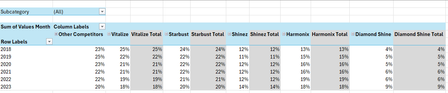
The attached option uses the same approach we've been discussing these last days. In summary:
- TableSource is filtered by the Slicer(s)
- PIVOTBY calc. the %age by [Year] & [Brand] relative to the Row Total. Data are sorted DESC according to [Brand] "best Total"
- The formula (below):
- Takes the PIVOTBY resulting array to Group [Brand] above - if any - the TOPN parameter
- Padds the [Brand] left with the appropriate number of Zero Width Space chars. to ensure [Brand] will be ordered according to there rank in the PivotTable & Chart, with [Grouped Brand] always as the last [Brand] whatever its rank is
- Unpivots the data as a single array that's used as PivotTable Data Source
PivotTable
- [Brand] must be sorted A-Z
- Until MSFT releases the PivotTable Auto Refresh functionality, any change on the Slicer(s) requires a Refresh of the PivotTable
Side effect of the Zero Width Spaces
- None on screen
- According to my researches none on printing - to be checked though...
- [Brand] on PivotTable/Chart <> TableSource[Brand]*
* I will provide more information on a separate post later
Formula
I did my best to make the variable names as clear as possible and decomposed as much as possible - any question let me know:
// Source_PivotTable
=LET(
  TOPN_value,         IF( ISBLANK( SETTINGS!TOPN_Default ), 5, SETTINGS!TOPN_Default ),
  GROUPED_BrandName,  IF( ISBLANK( SETTINGS!TOPN_GROUPED_Names ), "Other Brands", SETTINGS!TOPN_GROUPED_Names ),

  pivotedAllBrands,
    PIVOTBY(
      TableSource[Year], TableSource[Brand], TableSource[Values Month],
      PERCENTOF,
      0, 0, 1, 0, -2,
      TableSource[NOT_Filtered],
      1
    ),

  OtherBrand_Exists?,           COLUMNS( pivotedAllBrands) -1 > TOPN_value,
  groupedOtherBrand_If_Exists,
    IF( OtherBrand_Exists?,
      LET(
          TopnBrand_series,     CHOOSECOLS( pivotedAllBrands, SEQUENCE(, TOPN_value, 2 ) ),
          TopnBrand_values,     DROP( TopnBrand_series, 1 ),
          GroupedBrand_values,  BYROW( TopnBrand_values, LAMBDA(rw, 1 -SUM(rw) ) ),
          AllBrand_series,      VSTACK(
                                  HSTACK( TAKE( TopnBrand_series, 1 ), GROUPED_BrandName ),
                                  HSTACK( TopnBrand_values, GroupedBrand_values )
                                ),
          AllBrand_series
      ),
      pivotedAllBrands
    ),

       prep_UnPivoting_BEG,  "------------------------------------------------------",
            LeftCol_ToDrop,   --NOT( OtherBrand_Exists? ),
                brandNames,   DROP( TAKE( groupedOtherBrand_If_Exists, 1 ),, LeftCol_ToDrop ),
                brandCount,   COLUMNS( brandNames ),
           brandRanks_Desc,   SEQUENCE(, brandCount, brandCount, -1 ),
          paddedBrandNames,   REPT( UNICHAR(8203), brandRanks_Desc ) & brandNames,
                     years,   DROP( TAKE( pivotedAllBrands,, 1 ), 1 ),
                    values,   DROP( groupedOtherBrand_If_Exists, 1, LeftCol_ToDrop ),
            valuesNotBlank,   NOT( ISBLANK( values ) ),
       prep_UnPivoting_END,  "------------------------------------------------------",

    UnPivotedData,
      LET(
        UnPivot,            LAMBDA(array, TOCOL( IF( valuesNotBlank, array ) ) ),
        UnPivoted_years,    UnPivot( years ),
        UnPivoted_brands,   UnPivot( paddedBrandNames ),
        UnPivoted_values,   TOCOL( values ),
        HSTACK( UnPivoted_years, UnPivoted_brands, UnPivoted_values )
      ),

  VSTACK( {"Year", "Brand", "Value"}, UnPivotedData )
)
Cheers
Lz.

Hi Lorenzo,
I see what you mean. Ideally, I’d like ‘Other Brands’ fixed at the end of the legend. Do you know if there’s a way to force that order, maybe by customizing the sort or manually adjusting the legend?

First of all my sincere apologies re. slicer Year, your initial post was very clear re. what you expect.
Ideally, I’d like ‘Other Brands’ fixed at the end of the legend. Do you know if there’s a way to force that order, maybe by customizing the sort or manually adjusting the legend?
That's what I suspected and this makes totally sense - keep focus on the TOPN. I investigated and tested a number of options and found no way to customize/hide items on the Legend.
On the other hand I went ahead and implemented the solution with the workaround I posted on Chart from dynamic array challenge. This gives a PivotTable that looks the same as the array. But again, the issue was to force 'Other Brands' to stay at the end. And whatever I tried I couldn't make it happen w/o prefixing the Brand names with a ranking:
Not really nice but this makes things even more clear. The benefit of the Pivot approach is you have no more restrictions re. the TOPN value, it can be any number > 0. The only annoying thing is you'll have to do a Data > Refresh All every time you play with the Slicers until MSFT releases the Pivot Auto Refresh functionality
IMHO this a more robust option and if you want to add a Subcategory Slicer, add it from TableSource - not from the PivotTable - and this should work with no other changes
Hope this all makes sense
Cheers
Lz.
- Anonymous29007Feb 04, 2026Brass Contributor
Hi Lorenzo,
No worries, in fact I should have been more explicit in my description.
Thank you so much for taking the time to investigate this and for implementing this workaround. I really appreciate the effort you put into testing different options. I understand the limitation with the legend order, and I’m fine with the ranking prefix solution you’ve applied. It makes the output clear and consistent, and the added flexibility with the Pivot approach is a great benefit.
Thank you so much again for your support, this works well for my needs.
NB: I'm going to update this most recent approach as the marked solution. You deserve it! 🙂
Best regards,
YP
- LorenzoFeb 04, 2026Silver Contributor
Hi Anonymous29007 / YP
I'm glad you opted for the PivotTable/PivotChart option
- It would be smart of you to Like this post where Riny confirmed this will work w/o Refreshing once the upcoming Auto Refresh PivotTable functionality will be released
- Thanks for updating the marked solution - very few people do this - when the provide feedback... - Definitively smart of you 👍
Am afraid to say you'll have to redo #2 in a moment as I found a solution to order the Brands & always push "Other Brands" at the end w/o a numeric prefix. I just need to clean a couple of things & re-check a last time - should be avail. in an hour or saw...
- Anonymous29007Feb 04, 2026Brass Contributor
Hi Lorenzo,
- Thank you for mentioning this, I just went over there to give Riny a like.
- No problem, I like to give credit where it's due. This will also help others to find the right solution when reading this thread.
- Not a problem at all. Please take your time, I'm not in a hurry for this at all.