Forum Discussion

Top n vs. Others in Excel
- Feb 04, 2026
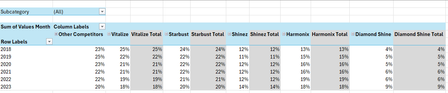
Thank you very much for providing the full context. Looking at the chart I better understand what Your challenge was 🤔
The attached option uses the same approach we've been discussing these last days. In summary:
- TableSource is filtered by the Slicer(s)
- PIVOTBY calc. the %age by [Year] & [Brand] relative to the Row Total. Data are sorted DESC according to [Brand] "best Total"
- The formula (below):
- Takes the PIVOTBY resulting array to Group [Brand] above - if any - the TOPN parameter
- Padds the [Brand] left with the appropriate number of Zero Width Space chars. to ensure [Brand] will be ordered according to there rank in the PivotTable & Chart, with [Grouped Brand] always as the last [Brand] whatever its rank is
- Unpivots the data as a single array that's used as PivotTable Data Source
PivotTable
- [Brand] must be sorted A-Z
- Until MSFT releases the PivotTable Auto Refresh functionality, any change on the Slicer(s) requires a Refresh of the PivotTable
Side effect of the Zero Width Spaces
- None on screen
- According to my researches none on printing - to be checked though...
- [Brand] on PivotTable/Chart <> TableSource[Brand]*
* I will provide more information on a separate post later
Formula
I did my best to make the variable names as clear as possible and decomposed as much as possible - any question let me know:
// Source_PivotTable
=LET(
  TOPN_value,         IF( ISBLANK( SETTINGS!TOPN_Default ), 5, SETTINGS!TOPN_Default ),
  GROUPED_BrandName,  IF( ISBLANK( SETTINGS!TOPN_GROUPED_Names ), "Other Brands", SETTINGS!TOPN_GROUPED_Names ),

  pivotedAllBrands,
    PIVOTBY(
      TableSource[Year], TableSource[Brand], TableSource[Values Month],
      PERCENTOF,
      0, 0, 1, 0, -2,
      TableSource[NOT_Filtered],
      1
    ),

  OtherBrand_Exists?,           COLUMNS( pivotedAllBrands) -1 > TOPN_value,
  groupedOtherBrand_If_Exists,
    IF( OtherBrand_Exists?,
      LET(
          TopnBrand_series,     CHOOSECOLS( pivotedAllBrands, SEQUENCE(, TOPN_value, 2 ) ),
          TopnBrand_values,     DROP( TopnBrand_series, 1 ),
          GroupedBrand_values,  BYROW( TopnBrand_values, LAMBDA(rw, 1 -SUM(rw) ) ),
          AllBrand_series,      VSTACK(
                                  HSTACK( TAKE( TopnBrand_series, 1 ), GROUPED_BrandName ),
                                  HSTACK( TopnBrand_values, GroupedBrand_values )
                                ),
          AllBrand_series
      ),
      pivotedAllBrands
    ),

       prep_UnPivoting_BEG,  "------------------------------------------------------",
            LeftCol_ToDrop,   --NOT( OtherBrand_Exists? ),
                brandNames,   DROP( TAKE( groupedOtherBrand_If_Exists, 1 ),, LeftCol_ToDrop ),
                brandCount,   COLUMNS( brandNames ),
           brandRanks_Desc,   SEQUENCE(, brandCount, brandCount, -1 ),
          paddedBrandNames,   REPT( UNICHAR(8203), brandRanks_Desc ) & brandNames,
                     years,   DROP( TAKE( pivotedAllBrands,, 1 ), 1 ),
                    values,   DROP( groupedOtherBrand_If_Exists, 1, LeftCol_ToDrop ),
            valuesNotBlank,   NOT( ISBLANK( values ) ),
       prep_UnPivoting_END,  "------------------------------------------------------",

    UnPivotedData,
      LET(
        UnPivot,            LAMBDA(array, TOCOL( IF( valuesNotBlank, array ) ) ),
        UnPivoted_years,    UnPivot( years ),
        UnPivoted_brands,   UnPivot( paddedBrandNames ),
        UnPivoted_values,   TOCOL( values ),
        HSTACK( UnPivoted_years, UnPivoted_brands, UnPivoted_values )
      ),

  VSTACK( {"Year", "Brand", "Value"}, UnPivotedData )
)
Cheers
Lz.

(You're welcome - Smart people deserve smart service and this case is definitively more interesting than anticipated)
Updated Chart from dynamic array challenge and TBH I now doubt there's - with current version - a solution. Nevertheless the approach works in your case as you're only concerned by the TOP 5 & Grouped Brands. So the report array always has max. 7 columns (1 for year(s) + 5 Top brands + 1 Grouped brands)
In the previous version with the CHART sheet and its Named ranges, when there's not enough data (simulated below) we get a Chart where the Legend is what it is and all the researches I did lead to the same conclusion: there's no way to hide Legend items with no/invalid values
Instead of using Named ranges for the Chart, the attached version generates an array of 7 columns in any case and the Chart is setup from that array in following the bullet points in Chart from dynamic array challenge. #N/A - instead of <blank> - display in the Legend on scenarios like the above one (replacing #N/A with <blank> is doable...):
- The #N/A columns & values are hidden with Conditional Formatting
- The Chart Title is dynamically adjusted to reflect what's displayed
- If you keep the sheet protected you won't see the little triangles on cells with errors
- If you change your mind and want to look at i.e. the TOP 3, see the SETTINGS sheet
Cont. on next post...
… cont.
IMHO there's something inconvenient with a Line Chart when you filter on a single year: you can't compare the Brands as the Chart shows nothing on the Plot area - a Bar Chart does
The attached version is the same as the previous one but displays a Bar Chart when there's only 1 Year reported, a Line Chart otherwise. This is done in following the demo. on Show or hide a Chart based on a condition. The 2 Charts (Bar / Line) are on hidden sheet 'HIDDEN_CHARTS'
Cheers
Lz.
 Anonymous29007Feb 02, 2026Brass Contributor
Hi Lorenzo,
Lorenzo wrote:
Nevertheless the approach works in your case as you're only concerned by the TOP 5 & Grouped Brands. So the report array always has max. 7 columns (1 for year(s) + 5 Top brands + 1 Grouped brands)
Cont. from previous reply... In terms of this ☝️, my goal wasn't to use years as a slicer at all. Because, as you also discovered 👇
Lorenzo wrote:
you can't compare the Brands as the Chart shows nothing on the Plot area
which is true. The years was only for the chart to show a time period, not to filter or slice. Therefore, I just wanted to filter/slice by Region and maybe Subcategory so that we could see the market share trend over time for a specific subcategory/all subcategories across a specific region/all regions.
I'm so sorry for not clarifying this earlier. I was wondering why you initially had years in the slicer all along. I didn't know this is what you were trying to show me (as you showed in the bar chart where we're comparing Top 5 vs. other brands for a specific year selected) - not in this case, so that won't be necessary.
The goal here is to just show how the brands market share evolved over a period of time (years) per region/all regions (slicer) and/or subcategory/all subcategory (slicer).
Hope this helps and my sincere apologies again.
Kind regards,
YP