Forum Discussion

Top n vs. Others in Excel
- Feb 04, 2026
Thank you very much for providing the full context. Looking at the chart I better understand what Your challenge was 🤔
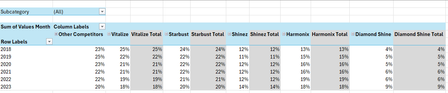
The attached option uses the same approach we've been discussing these last days. In summary:
- TableSource is filtered by the Slicer(s)
- PIVOTBY calc. the %age by [Year] & [Brand] relative to the Row Total. Data are sorted DESC according to [Brand] "best Total"
- The formula (below):
- Takes the PIVOTBY resulting array to Group [Brand] above - if any - the TOPN parameter
- Padds the [Brand] left with the appropriate number of Zero Width Space chars. to ensure [Brand] will be ordered according to there rank in the PivotTable & Chart, with [Grouped Brand] always as the last [Brand] whatever its rank is
- Unpivots the data as a single array that's used as PivotTable Data Source
PivotTable
- [Brand] must be sorted A-Z
- Until MSFT releases the PivotTable Auto Refresh functionality, any change on the Slicer(s) requires a Refresh of the PivotTable
Side effect of the Zero Width Spaces
- None on screen
- According to my researches none on printing - to be checked though...
- [Brand] on PivotTable/Chart <> TableSource[Brand]*
* I will provide more information on a separate post later
Formula
I did my best to make the variable names as clear as possible and decomposed as much as possible - any question let me know:
// Source_PivotTable
=LET(
  TOPN_value,         IF( ISBLANK( SETTINGS!TOPN_Default ), 5, SETTINGS!TOPN_Default ),
  GROUPED_BrandName,  IF( ISBLANK( SETTINGS!TOPN_GROUPED_Names ), "Other Brands", SETTINGS!TOPN_GROUPED_Names ),

  pivotedAllBrands,
    PIVOTBY(
      TableSource[Year], TableSource[Brand], TableSource[Values Month],
      PERCENTOF,
      0, 0, 1, 0, -2,
      TableSource[NOT_Filtered],
      1
    ),

  OtherBrand_Exists?,           COLUMNS( pivotedAllBrands) -1 > TOPN_value,
  groupedOtherBrand_If_Exists,
    IF( OtherBrand_Exists?,
      LET(
          TopnBrand_series,     CHOOSECOLS( pivotedAllBrands, SEQUENCE(, TOPN_value, 2 ) ),
          TopnBrand_values,     DROP( TopnBrand_series, 1 ),
          GroupedBrand_values,  BYROW( TopnBrand_values, LAMBDA(rw, 1 -SUM(rw) ) ),
          AllBrand_series,      VSTACK(
                                  HSTACK( TAKE( TopnBrand_series, 1 ), GROUPED_BrandName ),
                                  HSTACK( TopnBrand_values, GroupedBrand_values )
                                ),
          AllBrand_series
      ),
      pivotedAllBrands
    ),

       prep_UnPivoting_BEG,  "------------------------------------------------------",
            LeftCol_ToDrop,   --NOT( OtherBrand_Exists? ),
                brandNames,   DROP( TAKE( groupedOtherBrand_If_Exists, 1 ),, LeftCol_ToDrop ),
                brandCount,   COLUMNS( brandNames ),
           brandRanks_Desc,   SEQUENCE(, brandCount, brandCount, -1 ),
          paddedBrandNames,   REPT( UNICHAR(8203), brandRanks_Desc ) & brandNames,
                     years,   DROP( TAKE( pivotedAllBrands,, 1 ), 1 ),
                    values,   DROP( groupedOtherBrand_If_Exists, 1, LeftCol_ToDrop ),
            valuesNotBlank,   NOT( ISBLANK( values ) ),
       prep_UnPivoting_END,  "------------------------------------------------------",

    UnPivotedData,
      LET(
        UnPivot,            LAMBDA(array, TOCOL( IF( valuesNotBlank, array ) ) ),
        UnPivoted_years,    UnPivot( years ),
        UnPivoted_brands,   UnPivot( paddedBrandNames ),
        UnPivoted_values,   TOCOL( values ),
        HSTACK( UnPivoted_years, UnPivoted_brands, UnPivoted_values )
      ),

  VSTACK( {"Year", "Brand", "Value"}, UnPivotedData )
)
Cheers
Lz.

Attached is a very simplified version of your Brands report. No more dependency on the Data Model, CUBE/MDX formulas… Instead :
- Slicers are connected to TableSource
- TableSource has an hidden [NOT Filtered] column with formula that indicates if a row is filtered according to the slicer selections
- Above column is used as the filter_array arg. of the PIVOTBY formula. Using PERCENTOF (instead of SUM) as function & setting the appropriate col_sort_order allows sorting as expected & calculating the percentages as a single pass. The grouping the other Brands - if any - is done/calculated from the same array
// TOPN_BRANDS_REPORT
=LAMBDA([top_n],
  LET(
    TOPN_Value,     IF( ISOMITTED( top_n ), TOPN_Default, top_n ),
    pivotedBrands,  PIVOTBY(
                      TableSource[Year],
                      TableSource[Brand],
                      TableSource[Values Month],
                      PERCENTOF, 0, 0, 1, 0, -2,
                      TableSource[NOT_Filtered], 1
                    ),
    IF( COLUMNS( pivotedBrands ) -1 >= TOPN_Value,
      LET(
        arrTopn,        CHOOSECOLS( pivotedBrands, SEQUENCE(, TOPN_Value, 2 ) ),
        TopnValues,     DROP( arrTopn, 1 ),
        OtherValues,    BYROW( TopnValues, LAMBDA(rw, 1 - SUM( rw ) ) ),
        GroupedBrands,
          VSTACK(
            HSTACK( TAKE( arrTopn, 1 ), GROUPED_BrandsName ),
            HSTACK( TopnValues, OtherValues )           ),
            HSTACK( TAKE( pivotedBrands,, 1 ), GroupedBrands )
        ),
      pivotedBrands
    )
  )
)
Remains the challenge of the Chart I couldn't make fully dynamic (cf. Chart from dynamic array challenge | Microsoft Community Hub), hence the 'CHART' helper sheet in the workbook. If by any chance someone finds a solution to this issue I'll let you know...
Cheers
Lz.

Thank you so much Lorenzo for really going above and beyond in helping me with this Excel issue. The level of detail, patience, and effort you put into exploring this solution really stands out. Even though this problem is tricky, your dedication made a huge difference and gave me new insights I wouldn’t have found on my own. I truly appreciate the time you invested, it means a lot!