Forum Discussion

Top n vs. Others in Excel
- Feb 04, 2026
Thank you very much for providing the full context. Looking at the chart I better understand what Your challenge was 🤔
The attached option uses the same approach we've been discussing these last days. In summary:
- TableSource is filtered by the Slicer(s)
- PIVOTBY calc. the %age by [Year] & [Brand] relative to the Row Total. Data are sorted DESC according to [Brand] "best Total"
- The formula (below):
- Takes the PIVOTBY resulting array to Group [Brand] above - if any - the TOPN parameter
- Padds the [Brand] left with the appropriate number of Zero Width Space chars. to ensure [Brand] will be ordered according to there rank in the PivotTable & Chart, with [Grouped Brand] always as the last [Brand] whatever its rank is
- Unpivots the data as a single array that's used as PivotTable Data Source
PivotTable
- [Brand] must be sorted A-Z
- Until MSFT releases the PivotTable Auto Refresh functionality, any change on the Slicer(s) requires a Refresh of the PivotTable
Side effect of the Zero Width Spaces
- None on screen
- According to my researches none on printing - to be checked though...
- [Brand] on PivotTable/Chart <> TableSource[Brand]*
* I will provide more information on a separate post later
Formula
I did my best to make the variable names as clear as possible and decomposed as much as possible - any question let me know:
// Source_PivotTable
=LET(
  TOPN_value,         IF( ISBLANK( SETTINGS!TOPN_Default ), 5, SETTINGS!TOPN_Default ),
  GROUPED_BrandName,  IF( ISBLANK( SETTINGS!TOPN_GROUPED_Names ), "Other Brands", SETTINGS!TOPN_GROUPED_Names ),

  pivotedAllBrands,
    PIVOTBY(
      TableSource[Year], TableSource[Brand], TableSource[Values Month],
      PERCENTOF,
      0, 0, 1, 0, -2,
      TableSource[NOT_Filtered],
      1
    ),

  OtherBrand_Exists?,           COLUMNS( pivotedAllBrands) -1 > TOPN_value,
  groupedOtherBrand_If_Exists,
    IF( OtherBrand_Exists?,
      LET(
          TopnBrand_series,     CHOOSECOLS( pivotedAllBrands, SEQUENCE(, TOPN_value, 2 ) ),
          TopnBrand_values,     DROP( TopnBrand_series, 1 ),
          GroupedBrand_values,  BYROW( TopnBrand_values, LAMBDA(rw, 1 -SUM(rw) ) ),
          AllBrand_series,      VSTACK(
                                  HSTACK( TAKE( TopnBrand_series, 1 ), GROUPED_BrandName ),
                                  HSTACK( TopnBrand_values, GroupedBrand_values )
                                ),
          AllBrand_series
      ),
      pivotedAllBrands
    ),

       prep_UnPivoting_BEG,  "------------------------------------------------------",
            LeftCol_ToDrop,   --NOT( OtherBrand_Exists? ),
                brandNames,   DROP( TAKE( groupedOtherBrand_If_Exists, 1 ),, LeftCol_ToDrop ),
                brandCount,   COLUMNS( brandNames ),
           brandRanks_Desc,   SEQUENCE(, brandCount, brandCount, -1 ),
          paddedBrandNames,   REPT( UNICHAR(8203), brandRanks_Desc ) & brandNames,
                     years,   DROP( TAKE( pivotedAllBrands,, 1 ), 1 ),
                    values,   DROP( groupedOtherBrand_If_Exists, 1, LeftCol_ToDrop ),
            valuesNotBlank,   NOT( ISBLANK( values ) ),
       prep_UnPivoting_END,  "------------------------------------------------------",

    UnPivotedData,
      LET(
        UnPivot,            LAMBDA(array, TOCOL( IF( valuesNotBlank, array ) ) ),
        UnPivoted_years,    UnPivot( years ),
        UnPivoted_brands,   UnPivot( paddedBrandNames ),
        UnPivoted_values,   TOCOL( values ),
        HSTACK( UnPivoted_years, UnPivoted_brands, UnPivoted_values )
      ),

  VSTACK( {"Year", "Brand", "Value"}, UnPivotedData )
)
Cheers
Lz.

Hi
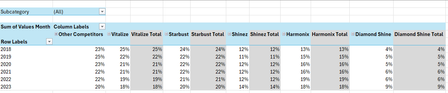
As I understand & assuming it's doable this would require Power Pivot - not sure & not my expertise 😒 However, I believe you should clarify how you expect to distinguish the TOP 5 (in green below) when several years display, ex.:
- Based on the Average by column/Brand or something else?
- What if the 6th, 7th... value equals the 5th?

Hi Lorenzo,
Thank you so much for your assistance, Power Pivot isn't my expertise either but, I do know a little bit.
To answer your question:
I determined the Top 5 brands according to the Total Sum of Values (I dragged Sum of Values Month twice and used the second column for rank after sorting them by descending order). In the screenshot below, when I was looking at this roughly, I determined the Top 5 brands according to their sum of values for each year to give me a grand total for all the years. Now, because I'm trying to show the brands evolution over time per region, I'm looking at the Total Rank which is based on the grand total (Total Sum of Values) for all years.
In addition to this, there was another approach that I did try, and that was to create some helper columns G and H (Rank and Brand Category).
For column G (Rank), I used the following formula:
=SUMPRODUCT((SUMIF([Brand],[Brand],[Values Month])>SUMIF([Brand],[@Brand],[Values Month]))/COUNTIF([Brand],[Brand]))+1For column H (Brand Category), I used this formula:
=IF([@Rank]<=5,[@Brand],"Other Brands")These two columns get me very close to what I'm trying to achieve. I get the correct result when I show all regions (no selection on slicer) and I get the correct result for the Center region. But, for North and South, the Top 3 ranks appear to be correct, but ranks 4 and 5 are wrong. So from here, I really don't know where I've gone wrong 😥.