Forum Discussion

Top n vs. Others in Excel
- Feb 04, 2026
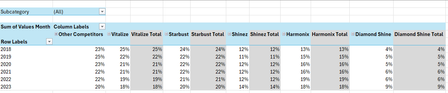
Thank you very much for providing the full context. Looking at the chart I better understand what Your challenge was 🤔
The attached option uses the same approach we've been discussing these last days. In summary:
- TableSource is filtered by the Slicer(s)
- PIVOTBY calc. the %age by [Year] & [Brand] relative to the Row Total. Data are sorted DESC according to [Brand] "best Total"
- The formula (below):
- Takes the PIVOTBY resulting array to Group [Brand] above - if any - the TOPN parameter
- Padds the [Brand] left with the appropriate number of Zero Width Space chars. to ensure [Brand] will be ordered according to there rank in the PivotTable & Chart, with [Grouped Brand] always as the last [Brand] whatever its rank is
- Unpivots the data as a single array that's used as PivotTable Data Source
PivotTable
- [Brand] must be sorted A-Z
- Until MSFT releases the PivotTable Auto Refresh functionality, any change on the Slicer(s) requires a Refresh of the PivotTable
Side effect of the Zero Width Spaces
- None on screen
- According to my researches none on printing - to be checked though...
- [Brand] on PivotTable/Chart <> TableSource[Brand]*
* I will provide more information on a separate post later
Formula
I did my best to make the variable names as clear as possible and decomposed as much as possible - any question let me know:
// Source_PivotTable
=LET(
  TOPN_value,         IF( ISBLANK( SETTINGS!TOPN_Default ), 5, SETTINGS!TOPN_Default ),
  GROUPED_BrandName,  IF( ISBLANK( SETTINGS!TOPN_GROUPED_Names ), "Other Brands", SETTINGS!TOPN_GROUPED_Names ),

  pivotedAllBrands,
    PIVOTBY(
      TableSource[Year], TableSource[Brand], TableSource[Values Month],
      PERCENTOF,
      0, 0, 1, 0, -2,
      TableSource[NOT_Filtered],
      1
    ),

  OtherBrand_Exists?,           COLUMNS( pivotedAllBrands) -1 > TOPN_value,
  groupedOtherBrand_If_Exists,
    IF( OtherBrand_Exists?,
      LET(
          TopnBrand_series,     CHOOSECOLS( pivotedAllBrands, SEQUENCE(, TOPN_value, 2 ) ),
          TopnBrand_values,     DROP( TopnBrand_series, 1 ),
          GroupedBrand_values,  BYROW( TopnBrand_values, LAMBDA(rw, 1 -SUM(rw) ) ),
          AllBrand_series,      VSTACK(
                                  HSTACK( TAKE( TopnBrand_series, 1 ), GROUPED_BrandName ),
                                  HSTACK( TopnBrand_values, GroupedBrand_values )
                                ),
          AllBrand_series
      ),
      pivotedAllBrands
    ),

       prep_UnPivoting_BEG,  "------------------------------------------------------",
            LeftCol_ToDrop,   --NOT( OtherBrand_Exists? ),
                brandNames,   DROP( TAKE( groupedOtherBrand_If_Exists, 1 ),, LeftCol_ToDrop ),
                brandCount,   COLUMNS( brandNames ),
           brandRanks_Desc,   SEQUENCE(, brandCount, brandCount, -1 ),
          paddedBrandNames,   REPT( UNICHAR(8203), brandRanks_Desc ) & brandNames,
                     years,   DROP( TAKE( pivotedAllBrands,, 1 ), 1 ),
                    values,   DROP( groupedOtherBrand_If_Exists, 1, LeftCol_ToDrop ),
            valuesNotBlank,   NOT( ISBLANK( values ) ),
       prep_UnPivoting_END,  "------------------------------------------------------",

    UnPivotedData,
      LET(
        UnPivot,            LAMBDA(array, TOCOL( IF( valuesNotBlank, array ) ) ),
        UnPivoted_years,    UnPivot( years ),
        UnPivoted_brands,   UnPivot( paddedBrandNames ),
        UnPivoted_values,   TOCOL( values ),
        HSTACK( UnPivoted_years, UnPivoted_brands, UnPivoted_values )
      ),

  VSTACK( {"Year", "Brand", "Value"}, UnPivotedData )
)
Cheers
Lz.

Hi
2 days with no reply probably means nobody's ready to re-create existing data (takes time), running the risk it doesn't reflect yours ==> Suggest you share your workbook (anonymized) with OneDrive, Google Drive or the like
Also, please mention the version of Excel you run and on which platform (Windows, Mac, Web...)
Hope this all makes sense
 Anonymous29007Jan 09, 2026Brass Contributor
Hi Lorenzo,
Thank you so much for guiding me on this platform. I'm kind of new here and don't quite know how things operate on this forum. I'm not sure if my previous reply to you went through because it isn't reflecting on my end but, I've managed to update my original post to reflect what you've suggested.
Thank you so much once again, I greatly appreciate it!