Forum Discussion

To only use data from a column if the cell in a row contain the first 4 letters


Instead of SUMMA.OM, use PRODUKTSUMMA:
=PRODUKTSUMMA((HELTAL(Data!F2:F10000/100)=N11)*Data!C2:C10000)

HansVogelaar
Hi Hans and thank you very much for engaging in my problem 🙂
I copy and pasted you formula in to the marked cell in my pic DATA3.jpg but unfortunattely it returned the error shown in attached pic DATA4.jpg
Though I cannot see how your formula consider the value "2001" (representing Year 20 and Month 01) in cell O10 as this is the only values that should be returned as a sum into cell O11?
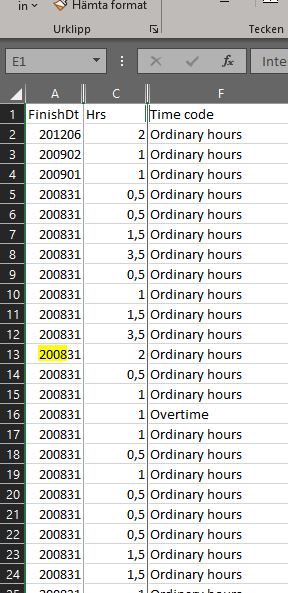
I inserted the pic DATA5.jpg that explains better the data in my previous attached DATA3.jpg
best regards
Bo

- HansVogelaarSep 02, 2020MVP
There is a discrepancy between your original description and your screenshots.
Try
=PRODUKTSUMMA((HELTAL(Data!A2:A10000/100)=O10)*Data!C2:C10000)
- eddievanSep 02, 2020Copper Contributor
HansVogelaar
Wow that worked, half way 😉
It returned all "2001", but I wanted to return all "2001" with "Ordinary hours only" in column F of tab DATA (see pic DATA4.jpg).
Sorry for not being clear enough 🙂- HansVogelaarSep 02, 2020MVP
In O11:
=PRODUKTSUMMA((HELTAL(Data!$A$2:$A$10000/100)=O$10)*(Data!$F$2:$F$10000=$N11);Data!$C$2:$C$10000)
Fill to the right and then down, or vice versa.
