Forum Discussion

Timesheet Tracker Help with INDEX/COUNT/SUM functions or alternative
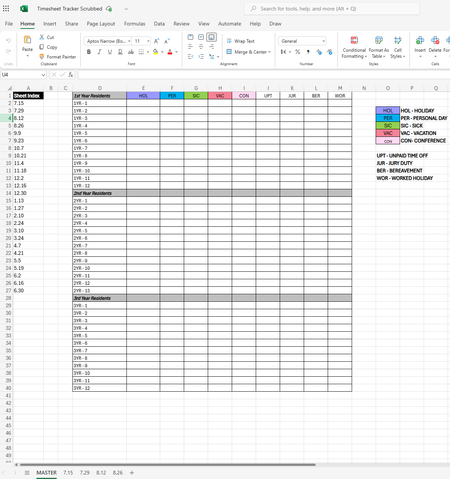
- Feb 10, 2025
Lets try the following formula-
=SUM(--(LET(x,VSTACK('7.15:8.26'!$B$6:$B$44),y,VSTACK('7.15:8.26'!$C$6:$Q$44),FILTER(y,x=$D2))=E$1))


This solution will obtain the totals all in one move.
=LET(
    stack, HSTACK('7.15:8.26'!B6:Q44),
    a, TAKE(stack, , 1),
    pto, DROP(stack, , 1),
    i, ROWS(residents),
    j, COLUMNS(classification),
    Summarize, LAMBDA(r, c,
        LET(
            each_resident, INDEX(residents, r),
            each_class, INDEX(classification, , c),
            filtered, FILTER(pto, a = each_resident, ""),
            SUM(N(filtered = each_class))
        )
    ),
    MAKEARRAY(i, j, Summarize)
)
The formula stacks the range in each sheet horizontally, picks out the resident and PTO data, and summarizes with MAKEARRAY.
The solution is often only as 'complex' as the arrangement of the data allows. If the data was all stored on one sheet and vertically arranged, we'd have a straight shot to an elegant solution with PIVOTBY or a pivot table.
 tshprdFeb 11, 2025Copper Contributor
Thank you! I will also take a look at this for my own insight/knowledge, but I was trying to avoid VBA scripts since our internal network likes to flag/block any macro-enabled files as potentially malicious.
However, I absolutely agree about wishing the data was all stored in on a single sheet! I was contemplating doing it myself before coming to this forum in hopes of avoiding that.