Forum Discussion

Hidden_User2304
Jul 24, 2024Copper Contributor
Timesheet calculations - help please
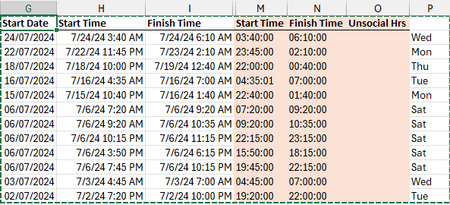
Going round in circles and finally admitting defeat. Photo of the data set I am currently working with - this relates to hours worked for staff. What I need to do in the unsocial hours column...

Patrick2788
Jul 24, 2024Silver Contributor
I offer my DownTime Lambda repurposed to fit your needs. This type of request appears every so often and I've used this function with 2 or 3 other requests.
At the sheet level it looks like:
The function (it's a bit lengthy because I wrote it so anyone can read it easier) :
DownTime = LAMBDA(start, stop,
        LET(
            Min_in_day, 1440,
            one_minute, 1 / Min_in_day,
            TotalMinutes, LAMBDA(begin, end,
                LET(
                    duration, (end - begin) * Min_in_day,
                    TotalTime, SEQUENCE(
                        duration,
                        ,
                        begin,
                        one_minute
                    ),
                    hr, TotalTime - INT(TotalTime),
                    Midnight, 0 / 24,
                    SixAM, 6 / 24,
                    include, ((hr >= Midnight) * (hr <= SixAM)),
                    Actual, FILTER(TotalTime, include, 0),
                    SUM(SIGN(Actual)) / Min_in_day
                )
            ),
            IFERROR(
                MAP(start, stop, TotalMinutes),
                (stop - start) * Min_in_day
            )
        )
    )
To get access to DownTime:
1. Move your data into the attached workbook
OR
2. Move/Copy the sheet from the attached workbook into your actual workbook.