Forum Discussion

Timesheet calculations - help please
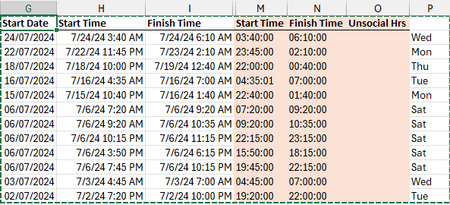

Hidden_User2304 A couple of shortcuts...
To extract the date from a date/time value:
=INT(date_time)
=INT(H2)
To extract the time from a date/time value:
=MOD(date_time,1)
=MOD(H2,1)
Then, apply custom formatting to the results as desired (e.g. hh:mm:ss).
Regarding your "Unsocial Hours" calculation, assuming a shift is never more than 18 hours long, you could try the following formula in cell O2 and copy it down:
=MAX(MIN(MOD(I2,1),0.25)-MOD(H2,1)*(INT(H2)=INT(I2)),0)
Then, apply custom formatting to display the results as [h]:mm.
However, if a single shift could be more than 18 hours long, and potentially start before 6am on one day (e.g. 07/01/2024 5:00 AM) and end after midnight the next day (e.g. 07/02/2024 1:00 AM), the formula would need to be modified as follows:
=MIN(MOD(I2,1),0.25)+MAX(0.25-MOD(H2,1),0)+(INT(I2)-INT(H2)-1)*0.25
Also, if you used =MOD(H2,1) in cell M2 and =MOD(I2,1) in cell N2, you could simplify the formula with cell references:
=MIN(N2,0.25)+MAX(0.25-M2,0)+(INT(I2)-INT(H2)-1)*0.25
Please see the attached sample workbook, if needed, which also contains other examples...