Forum Discussion

Tiered Formula for Dates
- Nov 27, 2019

Wyn Hopkins Morning Wyn,
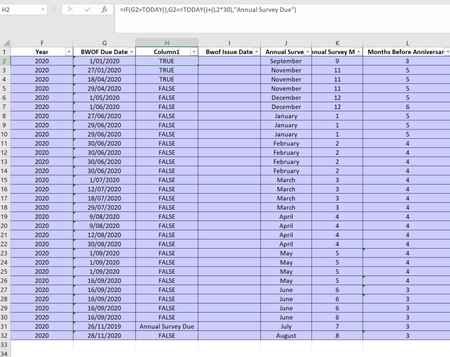
I've stripped out everything and attached a sample.
So 'Today' would always be the date that i'm working on the document and i'm always going to be working on the following year as in 01/01/2020. So if I was working on the document on 01/02/2020, the status would be 'Compliant'. If I was working on it on 25/10/2020, it would be 'Annual Survey Due'.
By date below, whatever the answer to Status 2 is (in this case 1st January 2020 - 90 days is 3rd October) Therefore between 1st January 2020 and 3rd October 2020, the status would be 'Compliant'. Between 4th October 2020 and 1st January 2021, status would be 'Annual Survey Due'. If a date hasn't been added into BWOF Issued (column I) and the date goes past 1st January 2021, the status would change to 'Overdue'.
I understand 90 days less than 1st January 2020 is back into 2019, so to calculate it to 2020 it may be easier to do a different formula to plus the days but I essentially just need the status to change 'Column L' months before the following anniversary date.
Cheers,
Dom

- DominicB1990Jan 27, 2020Copper Contributor
Hi Wyn Hopkins,
I've just started working on this again and the only problem i'm having is, when I issue a BWOF and put a date into 'BWOF Issue Date' column, I would like it to change the Status back to compliant as the BWOF isn't due again for another 12 months to the cycle starts again.
Any ideas?
Much appreciated,
Dom
- DominicB1990Nov 28, 2019Copper Contributor
That seems to be the one, i'm not able to put it all into BI yet, as i'm away but really appreciate your help!