Forum Discussion

there must be a better way to do this than using multiple pivot tables
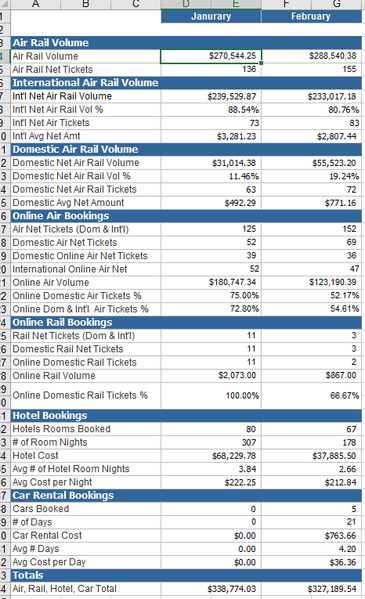
 Mar 21, 2024
=LET(rng,B2:C5,
REDUCE({"Air Rail Volume","Air Rail Tickets","Int' Air Rail Volume","Int' Air Rail Volume %","Int'l Air Rail Tickets","Int'l Air Rail Tickets %","Domestic Air Rail Volume","Domestic Air Rail Volume %","Domestic Air Rail Tickets","Domestic Air Rail Tickets %"},SEQUENCE(,COLUMNS(rng)),
LAMBDA(u,v,HSTACK(u,
VSTACK(INDEX(rng,1,v),
INDEX(rng,2,v),
INDEX(rng,3,v),
TEXT(INDEX(rng,3,v)/INDEX(rng,1,v),"00,00%"),
INDEX(rng,4,v),
TEXT(INDEX(rng,4,v)/INDEX(rng,2,v),"00,00%"),
INDEX(rng,1,v)-INDEX(rng,3,v),
TEXT(1-INDEX(rng,3,v)/INDEX(rng,1,v),"00,00%"),
INDEX(rng,2,v)-INDEX(rng,4,v),
TEXT(1-INDEX(rng,4,v)/INDEX(rng,2,v),"00,00%"))))))
With Office 365 or Excel for the web you can apply a dynamic array formula according to this example.
=LET(rng,B2:C5,
REDUCE({"Air Rail Volume","Air Rail Tickets","Int' Air Rail Volume","Int' Air Rail Volume %","Int'l Air Rail Tickets","Int'l Air Rail Tickets %","Domestic Air Rail Volume","Domestic Air Rail Volume %","Domestic Air Rail Tickets","Domestic Air Rail Tickets %"},SEQUENCE(,COLUMNS(rng)),
LAMBDA(u,v,HSTACK(u,
VSTACK(INDEX(rng,1,v),
INDEX(rng,2,v),
INDEX(rng,3,v),
TEXT(INDEX(rng,3,v)/INDEX(rng,1,v),"00,00%"),
INDEX(rng,4,v),
TEXT(INDEX(rng,4,v)/INDEX(rng,2,v),"00,00%"),
INDEX(rng,1,v)-INDEX(rng,3,v),
TEXT(1-INDEX(rng,3,v)/INDEX(rng,1,v),"00,00%"),
INDEX(rng,2,v)-INDEX(rng,4,v),
TEXT(1-INDEX(rng,4,v)/INDEX(rng,2,v),"00,00%"))))))
With Office 365 or Excel for the web you can apply a dynamic array formula according to this example.