Forum Discussion

TEXT PARSING
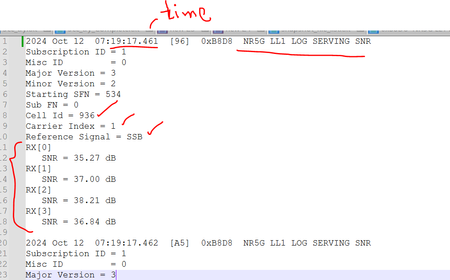
- Oct 18, 2024
See PQ attached file. Not optimized for sure, just made sure it does the job...
(don't forget to change the file path in query 'CSV', it's currently mine)

See PQ attached file. Not optimized for sure, just made sure it does the job...
(don't forget to change the file path in query 'CSV', it's currently mine)

Thanks Lorenzo , meanwhile do you know if and how I can bring all the SNR entry's in the same line as
their respective RX[] ports? I tried to play something replace etc " " with "", but nothing worked out.
In notepad++ how to achieve this?
Something like below:-
Thanks in Advance,
Br,
Anupam
- LorenzoOct 19, 2024Silver Contributor
If this is what you meant (query output):
In attached file function query:
// fxAlignRxSnr (InputTable as table) as table => let Source = InputTable, KeptColumn1 = Table.SelectColumns( Source, "Column1"), AddedIndex = Table.AddIndexColumn( KeptColumn1, "Index", 0, 1), FindRx = Table.FindText( AddedIndex, "RX["), Rx_FirstPosition = Table.First( FindRx )[Index], Rx_ToColumn = FindRx[Column1], Find_Snr = Table.FindText( AddedIndex, "SNR = "), Snr_ToColumn = Find_Snr[Column1], TableFromColumns = Table.FromColumns( { Rx_ToColumn, Snr_ToColumn }, {"RX", "SNR"} ), MergedColumns = Table.CombineColumns( TableFromColumns, {"RX", "SNR"}, Combiner.CombineTextByDelimiter("", QuoteStyle.None), "Column1" ), CombinedTables = Table.Combine( { Table.FirstN( AddedIndex, Rx_FirstPosition), MergedColumns } ), RemovedIndex = Table.RemoveColumns( CombinedTables, {"Index"} ) in // This prevents the function query to result as error if no "RX[" was found if Table.IsEmpty( FindRx ) then Source else RemovedIndex - LorenzoOct 18, 2024Silver Contributor
I don't understand as this is exactly what the query does, but in different columns as you asked.
If you expect another result (instead of Notepad++) please post a picture of the expected result (for 1 "record" ) with Excel/PQ and I'll have a look at it