Forum Discussion

anupambit1797
May 25, 2023Steel Contributor
Text After Delimiter
Dear Experts, Could you please help in below Query:- In Attached Excel, I want my data like in Column "B" only the Text after 4 spaces(Item xx), then in Column "C" the text aft...
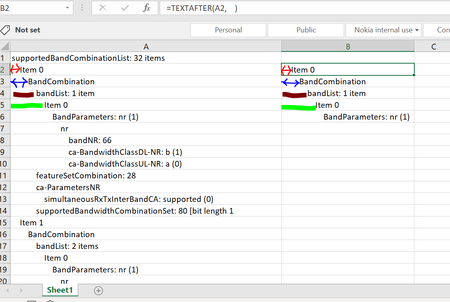

Patrick2788
May 26, 2023Silver Contributor
Maybe I'm simplifying things a bit too much (or not understanding the goal here) but if the objective is to pull the text after the leading spaces (which might be 4, 8, 12 spaces, etc). Why not use TRIM?
=TRIM(A2)
 anupambit1797May 26, 2023Steel Contributor
Patrick2788Thanks Patrick , but the intention is to put the text with different space in different columns
Br,
Anupam
- Patrick2788May 26, 2023Silver Contributor
Then I will have to indulge:
=LET( Level, (LEN(List) - LEN(TRIM(List))) / 4, MAKEARRAY( ROWS(List), 7, LAMBDA(r, c, IF(c = INDEX(Level, r), INDEX(List, r), "")) ) )- anupambit1797May 29, 2023Steel Contributor
Patrick2788Thank you Very much Patrick, this is very cool! Sorry for stupid question though..
List , I understood you used the Name Manager, what does "Level" ,"r" and "c" stands for here? and how to check their definition.. in the Name Manager only "List" is defined,
Thanks & Regards
Anupam Shrivastava