Forum Discussion

brunomerola
Aug 29, 2022Brass Contributor
Tabular Pivot Table with Excel Lambda and new array functions
Hello everyone, I've been learning and practicing Lambda helper functions for the last few months and I'm amazed by advanced techniques, especially with those that handle arrays of arrays - Peter...
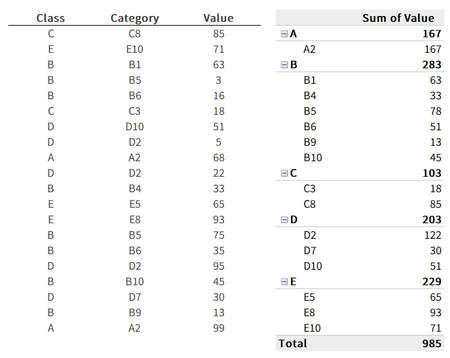
- Aug 29, 2022
This might explain my hesitance getting involved with issues of layout!
= LET(
    wildcards,      IFNA(HSTACK(UNIQUE(Data[Class]), "*"),"*"),
    distinct,       SORT(VSTACK(wildcards, UNIQUE(Data[[Class]:[Category]])),{1,2}),
    class,          CHOOSECOLS(distinct,1),
    category,       CHOOSECOLS(distinct,2),
    sumValue,       SUMIFS(Data[Value], Data[Class], class, Data[Category], category),
    outputClass,    IF(category="*", class, ""),
    outputCategory, IF(category<>"*", category, ""),
    output,         HSTACK(outputClass, outputCategory, sumValue),
    totalrow,       HSTACK("Total", "", SUM(Data[Value])),
    VSTACK(output, totalrow)
 )

brunomerola
Aug 29, 2022Brass Contributor
Thank you very much for the quick response, but how can we actually interlace class and subtotals and sort each group of categories inside each class?
The example has categories that start with the class letter, but this will not be the case in my real case application.
The example has categories that start with the class letter, but this will not be the case in my real case application.

PeterBartholomew1
Aug 29, 2022Silver Contributor
This might explain my hesitance getting involved with issues of layout!
= LET(
    wildcards,      IFNA(HSTACK(UNIQUE(Data[Class]), "*"),"*"),
    distinct,       SORT(VSTACK(wildcards, UNIQUE(Data[[Class]:[Category]])),{1,2}),
    class,          CHOOSECOLS(distinct,1),
    category,       CHOOSECOLS(distinct,2),
    sumValue,       SUMIFS(Data[Value], Data[Class], class, Data[Category], category),
    outputClass,    IF(category="*", class, ""),
    outputCategory, IF(category<>"*", category, ""),
    output,         HSTACK(outputClass, outputCategory, sumValue),
    totalrow,       HSTACK("Total", "", SUM(Data[Value])),
    VSTACK(output, totalrow)
)- brunomerolaAug 29, 2022Brass ContributorThis is a game changer. Thank you so much.