Forum Discussion

flt655
Oct 18, 2019Copper Contributor
Table manipulation
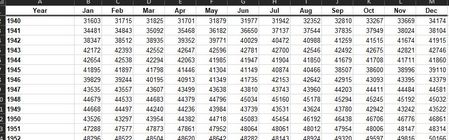
I have this table and I would like to graph the trends over the years. I don't know how to get excel to see 1940 Jan-dec and then cycle to 1941. I could pivot it all to two columns (date mm/yyyy and ...
- Oct 18, 2019
Your data is already in the pivoted form so ideally you should unpivot it using the Power Query and insert a Pivot Chart with Months in Rows along with a Slicer on Year.
The attached shows another approach where you can derive the chart data based on a year selected from the dropdown on sheet2.
See if this is something you can work with.


PeterBartholomew1
Oct 20, 2019Silver Contributor
It is also possible to unpivot a crosstab array by formula. It is easiest using modern dynamic arrays but possible with legacy CSE or by named formulae to generate chart data. Row and column numbers are defined by
= 1 + QUOTIENT(k-1,12)
= 1 + MOD(k-1,12)
giving unpivoted arrays for the year and value fields
= INDEX( Year, rowNum )
= INDEX( Values, rowNum, colNum )
